> ## Documentation Index
> Fetch the complete documentation index at: https://docs.semgrep.dev/llms.txt
> Use this file to discover all available pages before exploring further.
# Set a primary branch
A **primary branch** is the base or target branch for pull requests and merge requests. It is usually referred to as a **default branch** or **trunk** by your source code manager (SCM). Typical names for a primary branch include `dev`, `production`, or `develop`.
In many cases, Semgrep automatically detects primary branches when they first scan your project. If you have projects (repositories) with unique primary branch names, you can set them through the Semgrep web app.
A primary branch enables Semgrep to filter your findings by branch and to accurately deduplicate findings. The primary branch is also used to analyze the deployment of [secure guardrails](/secure-guardrails/secure-guardrails-in-semgrep) to your developers; findings fixed before they are merged into the primary branch reduces the overall production backlog.
The following video provides an introduction and walkthrough:
## Prerequisite
Ensure that the project you want to set a primary branch for has completed **at least one full scan** successfully.
## Find projects without a primary branch
Projects without primary branches have an orange information icon next to their name in the **Projects** page.
## Changes to existing URLs
For Semgrep AppSec Platform users whose accounts were created prior to September 4, 2024, this feature may affect any bookmarks or saved links created for custom views or slices in product pages such as **Code**, **Supply Chain > Vulnerabilities**, and **Secrets**. The primary branch feature deprecates certain filters, which affect the parameters in your URL. In these cases, you may have to re-create your bookmarks.
* The following parameters are deprecated:
* `ref=_default`
* `ref=_other`
* For **Code** page and **Supply Chain > Vulnerabilities** tab:
* Bookmarks that use the `ref` parameter without a `repo`, your URL will be redirected to the default view instead.
* Bookmarks that use any number of `repo` parameters without a `ref` will display the findings of primary branches for all repositories selected.
* Any filters using multiple `refs` now show only one `ref`, such as the primary branch.
## Set a project's primary branch
* Primary branches are set on a **per-project** basis in the Semgrep web app. To quickly update your primary branches, use the [API endpoint](#through-an-api-endpoint).
* For more information on how primary branches may affect existing projects behavior see:
* [Changes to existing URLs](#changes-to-existing-urls)
* [How Semgrep counts findings in the projects page](/deployment/primary-branch#how-semgrep-counts-findings-in-the-projects-page)
### Through the web app
**INFO**
For Semgrep AppSec Platform users whose accounts were created prior to
September 4, 2024, you may have to sign out and sign in again for this feature
to appear.
In the Semgrep web app, click **Projects**.
Search for your project's name.
Click the ** gear icon** to access the settings page for that project.
In the **Primary branch** section, click the drop-down box and select a branch. The drop-down menu shows a list of **scanned branches**.
Click **Save**.
***Figure**. Projects > Project settings page > Primary branch selection.*
### Through an API endpoint
You can also send a `patch` request to the following endpoint: [Deployment > Project endpoint](/api-reference/v1/projectsservice/update-project-details). Add the `primary_branch` key in the request body.
### How Semgrep counts findings in the Projects page
You can view a total count of findings in the **Projects** page for all Semgrep products.
* For Code and Supply Chain, this total count is computed from the **primary branch**.
* For Secrets, this total count is computed from deduplicated findings across all branches.
This means that the count of findings in your Code, Secrets, or Supply Chain page may differ from the counts in your Projects page.
The following links explain how Semgrep presents findings for each Semgrep product in their respective page:
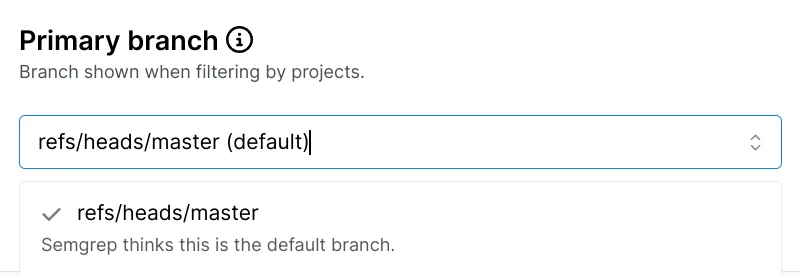 ***Figure**. Projects > Project