> ## Documentation Index
> Fetch the complete documentation index at: https://docs.semgrep.dev/llms.txt
> Use this file to discover all available pages before exploring further.
# How to connect Semgrep and DefectDojo
[DefectDojo](https://www.defectdojo.com/) is a well-known vulnerability management tool. It allows you to gather security issues from other tools, including Semgrep. By integrating Semgrep findings into DefectDojo, security teams can more easily monitor their overall security posture.
## Integration
Follow these steps to prepare DefectDojo and generate Semgrep findings in the proper format:
In DefectDojo:
i. Create your [**product**](https://defectdojo.github.io/django-DefectDojo/usage/models/#products).
ii. In that DefectDojo product, create an [engagement](https://defectdojo.github.io/django-DefectDojo/usage/models/#engagement), called `semgrep`. This is a CI/CD engagement type and the name designates the CI/CD tool used.
Run semgrep as `semgrep ... --json > report.json` to generate a JSON report.
Now, you are ready to use the [DefectDojo API](https://demo.defectdojo.org/api/v2/oa3/swagger-ui/).
### DefectDojo API example
To run API DefectDojo operations such as GET, POST, and DELETE, an API token is necessary. To get it, follow the [API guide](https://defectdojo.github.io/django-DefectDojo/integrations/api-v2-docs/).
Once you have a token, store it as an environment variable named `DEFECT_DOJO_API_TOKEN`:
```bash theme={null}
export DEFECT_DOJO_API_TOKEN=[YOUR_DEFECT_DOJO_TOKEN]
```
The DefectDojo API uses the `/api/v2/import-scan/` endpoint for the first import and the `/api/v2/reimport-scan` endpoint for following imports.
These endpoints take the following parameters:
* `file`: The Semgrep scan findings report or export in JSON format.
* `scan_type`: A descriptive name for the scan type. In this example, the scan type is "Semgrep JSON Report\`".
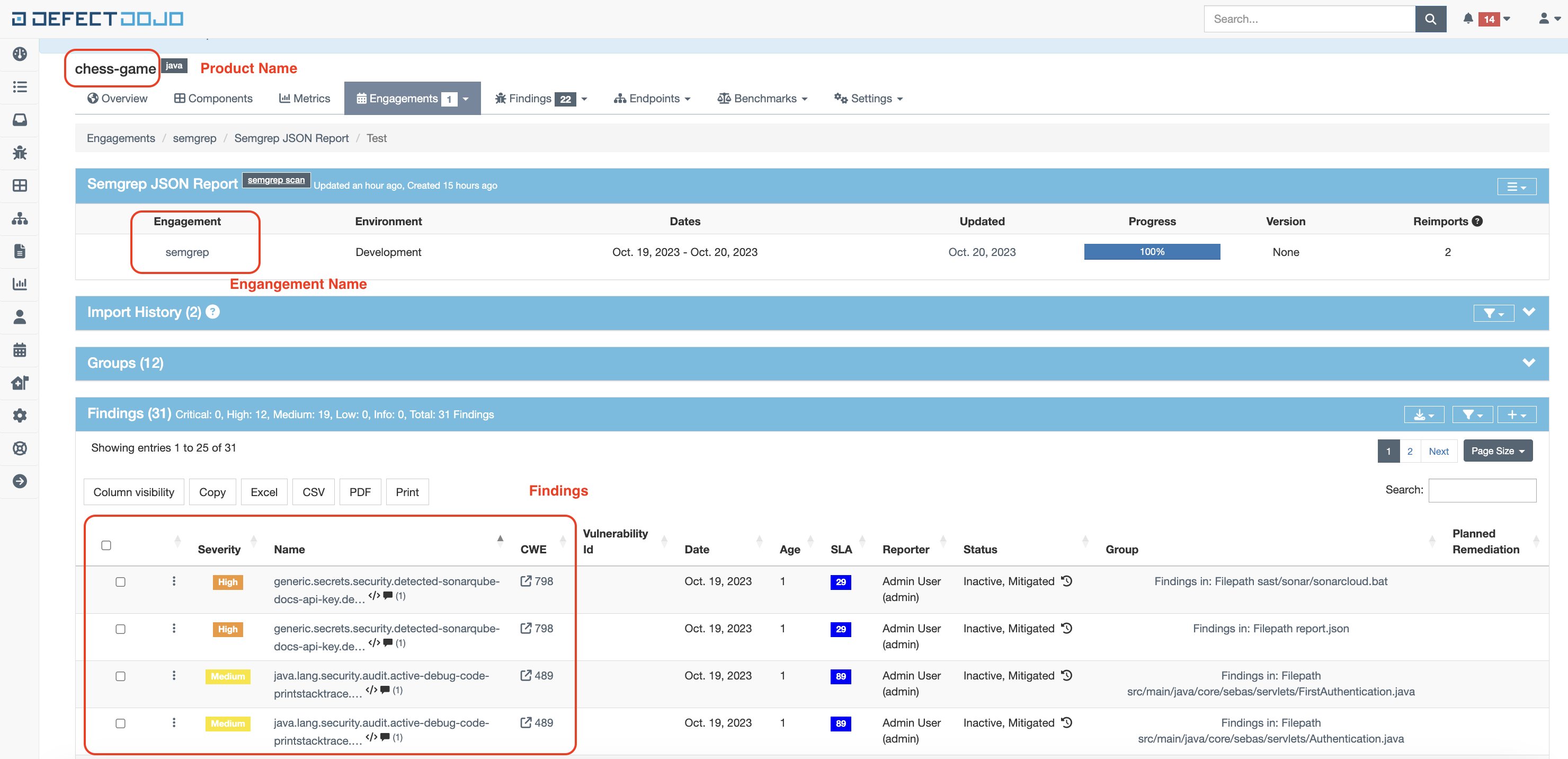
* `product_name`: The name of the product in DefectDojo to send the Semgrep findings report to.
* `engagement_name`: The name of the engagement you created the preceding "Integration" section. In this example, `semgrep`.
**INFO**
The DefectDojo API allows identifying the parameters either by name or by ID. This example follows the **By name** approach.
Here is an example snippet of a Python function using this endpoint:
```python expandable theme={null}
def uploadToDefectDojo(is_new_import, token, url, product_name, engagement_name, filename):
multipart_form_data = {
'file': (filename, open(filename, 'rb')),
'scan_type': (None, 'Semgrep JSON Report'),
'product_name': (None, product_name),
'engagement_name': (None, engagement_name),
}
endpoint = '/api/v2/import-scan/' if is_new_import else '/api/v2/reimport-scan/'
r = requests.post(
url + endpoint,
files=multipart_form_data,
headers={
'Authorization': 'Token ' + token,
}
)
if r.status_code != 200:
sys.exit(f'Post failed: {r.text}')
print(r.text)
```
The full version of this Python script can be found [here](https://github.com/r2c-CSE/semgrep-utilities/blob/main/integrations/defectdojo/import_semgrep_to_defect_dojo.py). Feel free to use this in your own environment after reviewing the script to make sure it works for you.
### Running the script
To continue with the preceding example and run the script, execute the following command:
python3 integrations/defectdojo/import\_semgrep\_to\_defect\_dojo.py --host DOJO\_URL --product PRODUCT\_NAME --engagement ENGAGEMENT\_NAME --report REPORT\_FILE
Where:
* `DOJO_URL` is the URL where DefectDojo is.
* `PRODUCT_NAME` is the DefectDojo product name.
* `ENGAGEMENT_NAME` is the DefectDojo engagement name for that product.
* `REPORT_FILE` is the Semgrep report path.
## Integrating Semgrep and DefectDojo in a CI pipeline
To prevent tampering with findings, it is crucial to import scan results to DefectDojo in the **same pipeline or CI job** as the scan itself.
The following is an example of a GitLab job importing Semgrep findings to DefectDojo:
```yaml expandable theme={null}
import-semgrep-to-defectdojo:
stage: import
image: python:3.9-bullseye
script:
- echo "Importing Semgrep scan to DefectDojo"
- pip3 install requests
- curl -O https://raw.githubusercontent.com/r2c-CSE/semgrep-utilities/main/integrations/defectdojo/import_semgrep_to_defect_dojo.py
# Adding checksum validation
- echo $IMPORT_SEMGREP_TO_DEFECTDOJO_SHA_CHECKSUM > sha-import-dd.tmp
- shasum -a 256 -U -c sha-import-dd.tmp
- python3 import_semgrep_to_defect_dojo.py --host $DEFECTDOJO_URL --product $PRODUCT --engagement semgrep --report report.json || true
rules:
# Scan changed files in MRs, (diff-aware scanning):
- if: $CI_MERGE_REQUEST_IID
# Scan mainline (default) branches and report all findings.
- if: $CI_COMMIT_BRANCH == $CI_DEFAULT_BRANCH
tags:
- defectdojo
variables:
DEFECT_DOJO_API_TOKEN: $DEFECT_DOJO_API_TOKEN
```
**TIP**
As a good security practice, this pipeline includes checksum validation for the import script, to ensure that the script has not been tampered with.
There are some environment variables defined in the `gitlab-ci.yml` file, such as:
* `DEFECTDOJO_URL`
* `PRODUCT`
* `IMPORT_SEMGREP_TO_DEFECTDOJO_SHA_CHECKSUM`
They must be defined in the GitLab pipeline. Settings->CI/CD->Variables:
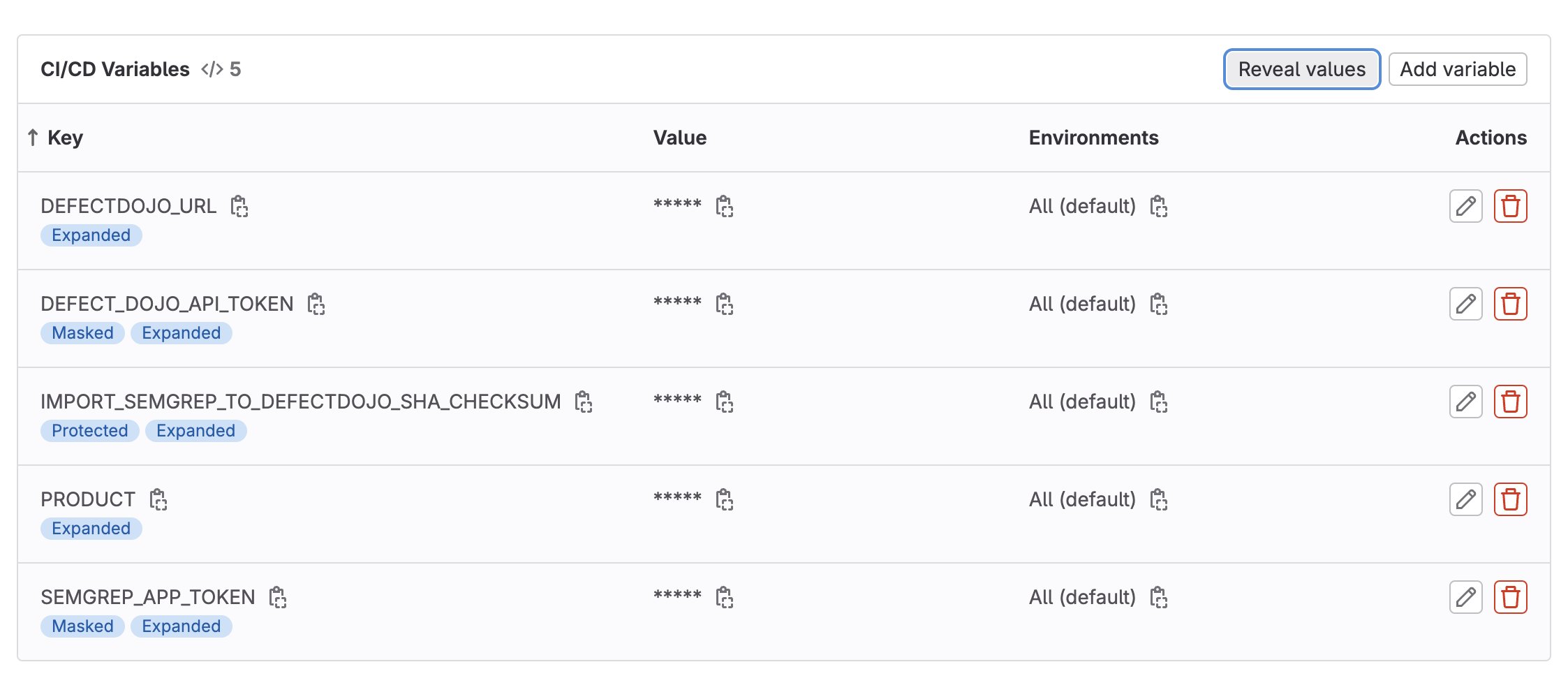 In the example, the values are:
* `DEFECTDOJO_URL` = [http://localhost:8080/](http://localhost:8080/) (Local DefectDojo deployment)
* `PRODUCT` = chess-game
* `IMPORT_SEMGREP_TO_DEFECTDOJO_SHA_CHECKSUM` = c41aed4055adeee415b795cc17a069b144fb51bc31f6c4925be3b82d0b54de33 Uimport\_semgrep\_to\_defect\_dojo.py
The content for this last variable was generated with the following command:
`shasum -a 256 -U import_semgrep_to_defect_dojo.py`
This command generates a unique checksum, taking as input the content of the script, and it will be used to verify that the script has not changed.
In the pipeline, the integrity of the script is verified with the following commands:
```
echo $IMPORT_SEMGREP_TO_DEFECTDOJO_SHA_CHECKSUM > sha-import-dd.tmp
shasum -a 256 -U -c sha-import-dd.tmp
```
If the script has not changed since the checksum was generated, the pipeline will continue normal execution. Otherwise it will stop and return an error.
Example DefectDojo screenshot, after a pipeline execution:
In the example, the values are:
* `DEFECTDOJO_URL` = [http://localhost:8080/](http://localhost:8080/) (Local DefectDojo deployment)
* `PRODUCT` = chess-game
* `IMPORT_SEMGREP_TO_DEFECTDOJO_SHA_CHECKSUM` = c41aed4055adeee415b795cc17a069b144fb51bc31f6c4925be3b82d0b54de33 Uimport\_semgrep\_to\_defect\_dojo.py
The content for this last variable was generated with the following command:
`shasum -a 256 -U import_semgrep_to_defect_dojo.py`
This command generates a unique checksum, taking as input the content of the script, and it will be used to verify that the script has not changed.
In the pipeline, the integrity of the script is verified with the following commands:
```
echo $IMPORT_SEMGREP_TO_DEFECTDOJO_SHA_CHECKSUM > sha-import-dd.tmp
shasum -a 256 -U -c sha-import-dd.tmp
```
If the script has not changed since the checksum was generated, the pipeline will continue normal execution. Otherwise it will stop and return an error.
Example DefectDojo screenshot, after a pipeline execution:
 ## Conclusions
If you use multiple vulnerability tools, including Semgrep, importing results to [DefectDojo](https://www.defectdojo.com/) can be helpful in managing data across all of these tools.
## Conclusions
If you use multiple vulnerability tools, including Semgrep, importing results to [DefectDojo](https://www.defectdojo.com/) can be helpful in managing data across all of these tools.