> ## Documentation Index
> Fetch the complete documentation index at: https://docs.semgrep.dev/llms.txt
> Use this file to discover all available pages before exploring further.
# Secure guardrails in Semgrep
> Secure guardrails guide **developers** towards fixing security issues in the early stages of development. By deploying secure guardrails, you can:
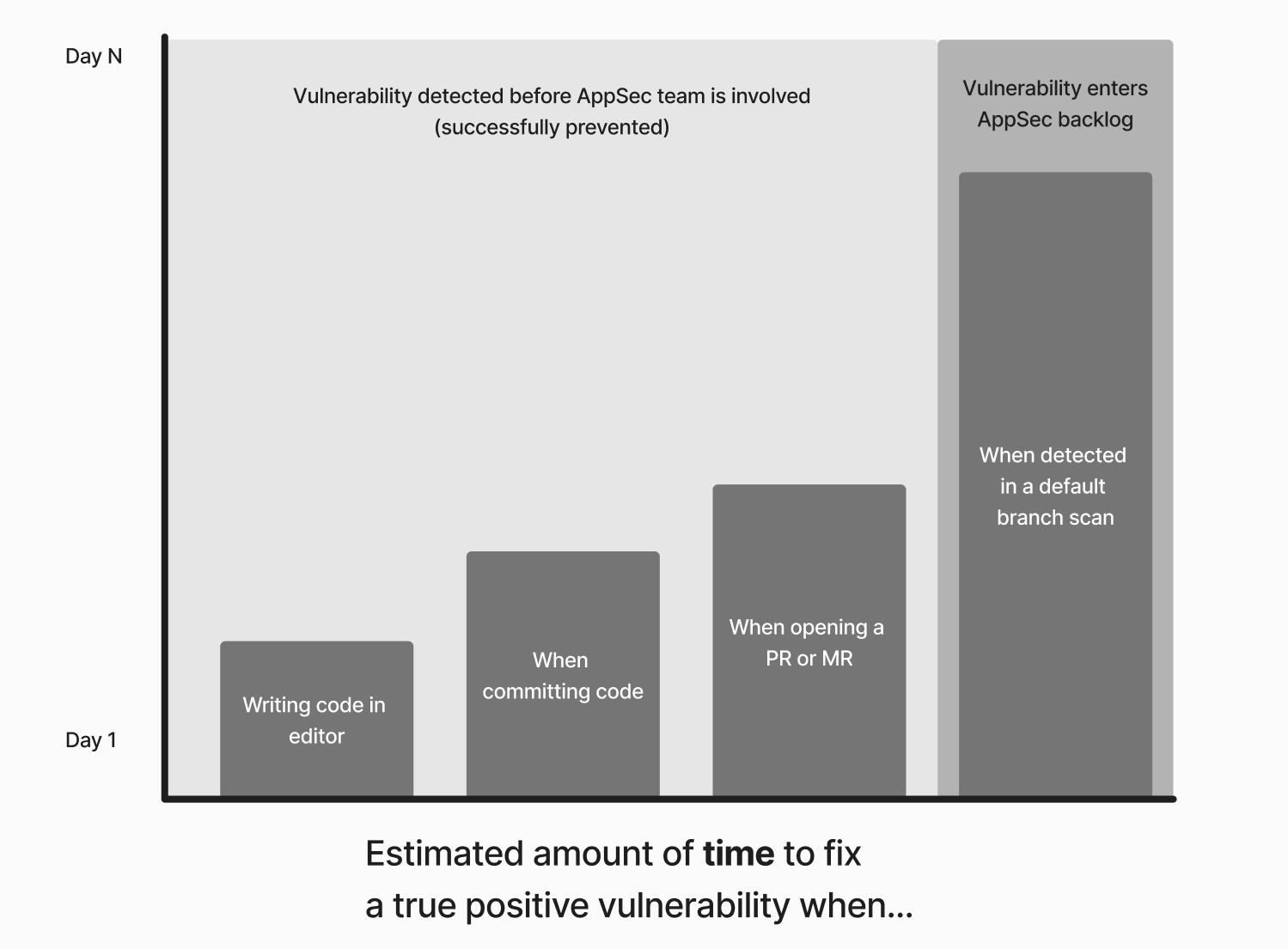
* Prevent issues from merging into production or default branches. This improves security posture and reduces the growth of the vulnerability backlog.
* Reduce the time and cost to address issues—the earlier a vulnerability is detected, the faster it is to fix.
The deployment of secure guardrails maximizes the impact of early detection by providing **specific** and **actionable** remediation guidance to developers. Customization enables you to set the **amount of alerts** that developers receive.
This document defines secure guardrails and presents an overview of the guardrail deployment process in Semgrep.
 Secure guardrails consist of:
**Content**
Secure guardrails consist of:
**Content**
The content that identifies, explains, and provides remediation guidance for the security issue, such as the Semgrep rule and Semgrep Multimodal (AI) remediation guidance.
Semgrep uses **rules**, which are instructions that detect patterns in your code, such as security issues, bugs, and more. Semgrep generates and reports **findings** to you whenever it finds code that matches the patterns defined by rules.
Semgrep rules also include a **message** that guides remediation and provides other metadata about the vulnerability, such as its OWASP category, which are presented to the developer. Further improvements to this guidance are made through Semgrep Multimodal.
**Interface**
The developer-native **interface** where the developer can see the content and triage or remediate the finding, such as Visual Studio Code (VS Code), pre-commit on CLI, or GitHub pull request comments. See [all supported interfaces](#support-for-developer-interfaces-pre-build).
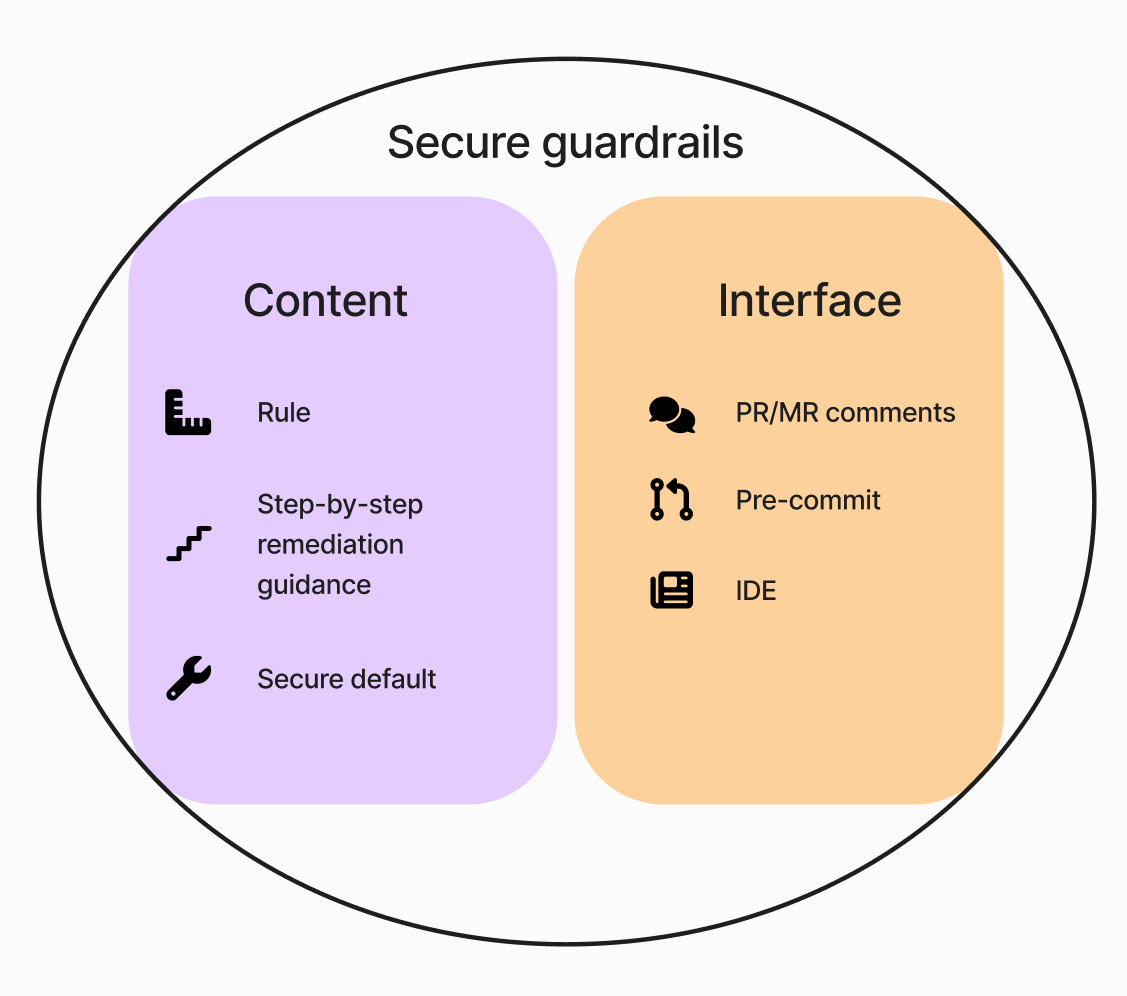 ***Figure**. Semgrep products provide the content of the guardrail, namely its rules and suggested remediations. The [Semgrep web app](https://semgrep.dev/login) provides the means to configure and deploy guardrails: what rules to deploy as well as where and how to alert developers.*
## Qualities of secure guardrails
### Speed
Scans must be quick to successfully integrate into developer workflows without slowing them down.
The following table lists the speed of a Semgrep scan in relation to the environment the scan is run in:
| Interface | Scope of scan | Analysis | Typical speed |
| :-------------------------------------------------------------- | :------------------------------------------------------------- | :----------------------------------- | :--------------- |
| IDE (per keystroke and on save) | Current file | Single-function, single-file | In a few seconds |
| CLI on commit (through [`pre-commit`](https://pre-commit.com/)) | Files staged for commit (cross-function, single-file analysis) | Cross-function, single-file | Under 5 minutes |
| PR or MR comments | All committed files and changes in the PR or MR | Cross-function, single-file analysis | Under 5 minutes |
### Support for developer interfaces (pre-build)
Guardrails should be able to provide remediation guidance and means to triage findings or give feedback within developer interfaces.
Semgrep supports the following interfaces:
| Interface | Supported providers and apps | Triage and remediation actions |
| :----------------------- | :-------------------------------------------------------------------------------------------------- | :------------------------------------------------------------------------------------------------------------------------------------------------------------------------------------------------------------------------------------------------------------------------------------------- |
| IDEs | [Visual Studio Code (VS Code)](https://marketplace.visualstudio.com/items?itemName=Semgrep.semgrep) |
***Figure**. Semgrep products provide the content of the guardrail, namely its rules and suggested remediations. The [Semgrep web app](https://semgrep.dev/login) provides the means to configure and deploy guardrails: what rules to deploy as well as where and how to alert developers.*
## Qualities of secure guardrails
### Speed
Scans must be quick to successfully integrate into developer workflows without slowing them down.
The following table lists the speed of a Semgrep scan in relation to the environment the scan is run in:
| Interface | Scope of scan | Analysis | Typical speed |
| :-------------------------------------------------------------- | :------------------------------------------------------------- | :----------------------------------- | :--------------- |
| IDE (per keystroke and on save) | Current file | Single-function, single-file | In a few seconds |
| CLI on commit (through [`pre-commit`](https://pre-commit.com/)) | Files staged for commit (cross-function, single-file analysis) | Cross-function, single-file | Under 5 minutes |
| PR or MR comments | All committed files and changes in the PR or MR | Cross-function, single-file analysis | Under 5 minutes |
### Support for developer interfaces (pre-build)
Guardrails should be able to provide remediation guidance and means to triage findings or give feedback within developer interfaces.
Semgrep supports the following interfaces:
| Interface | Supported providers and apps | Triage and remediation actions |
| :----------------------- | :-------------------------------------------------------------------------------------------------- | :------------------------------------------------------------------------------------------------------------------------------------------------------------------------------------------------------------------------------------------------------------------------------------------- |
| IDEs | [Visual Studio Code (VS Code)](https://marketplace.visualstudio.com/items?itemName=Semgrep.semgrep) | - Receive human-written remediation guidance.
- Ignore or apply a [Rule-defined fix](/writing-rules/rule-defined-fix), if it is available, to findings individually.
|
| IDEs | [IntelliJ-based IDEs](https://plugins.jetbrains.com/plugin/22622-semgrep) | - Receive human-written remediation guidance.
- Ignore or apply a [Rule-defined fix](/writing-rules/rule-defined-fix), if it is available, to findings individually.
|
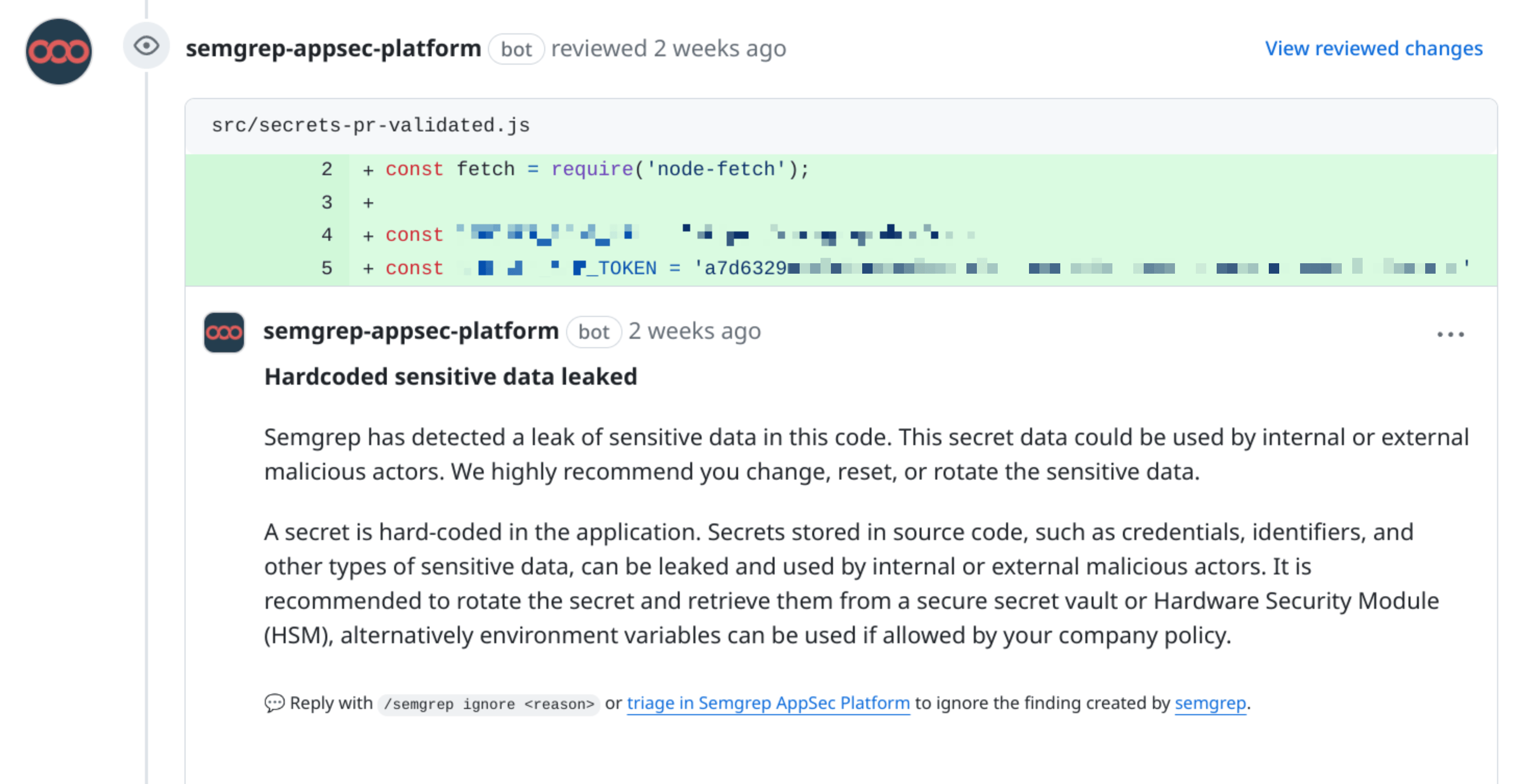
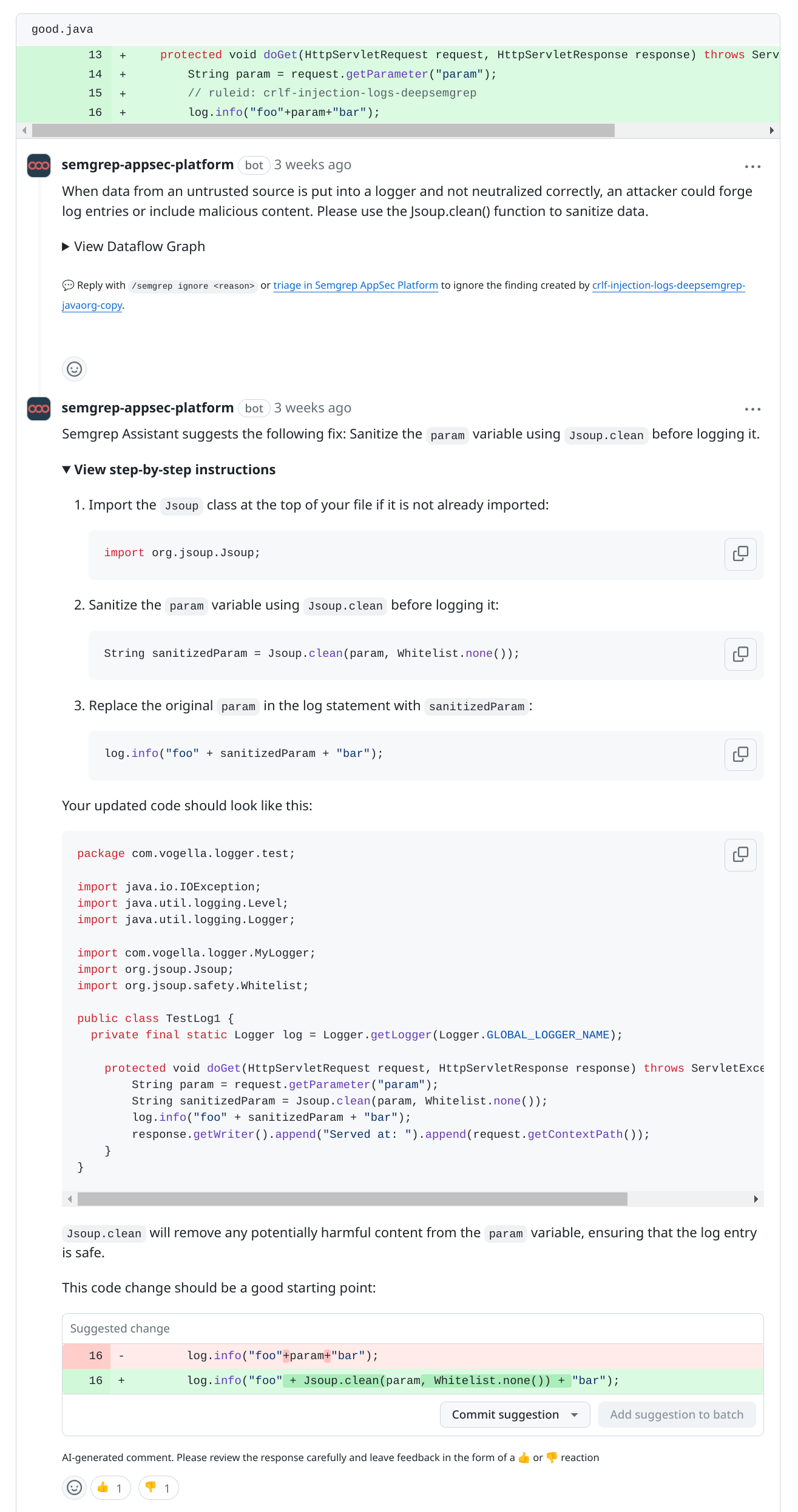
| PR or MR comments | [All GitHub plans](/semgrep-appsec-platform/github-pr-comments) | - Receive human-written and Semgrep Multimodal remediation guidance\*; you can customize the confidence level at which the AI leaves a comment.
- Ignore or apply a [Rule-defined fix](/writing-rules/rule-defined-fix), if it is available, to findings individually.
|
| PR or MR comments | [All GitLab plans](/semgrep-appsec-platform/gitlab-mr-comments) | - Receive human-written and Semgrep Multimodal remediation guidance\*; you can customize the confidence level at which the AI leaves a comment.
- Ignore or apply a [Rule-defined fix](/writing-rules/rule-defined-fix), if it is available, to findings individually.
|
| PR or MR comments | [All Bitbucket plans](/category/bitbucket-pr-comments) | - Receive human-written and Semgrep Multimodal remediation guidance\*; you can customize the confidence level at which the AI leaves a comment.
- Ignore or apply a [Rule-defined fix](/writing-rules/rule-defined-fix), if it is available, to findings individually.
|
| PR or MR comments | [Azure DevOps Cloud](/semgrep-appsec-platform/azure-pr-comments) | - Receive human-written and Semgrep Multimodal remediation guidance\*; you can customize the confidence level at which the AI leaves a comment.
- Ignore or apply a [Rule-defined fix](/writing-rules/rule-defined-fix), if it is available, to findings individually.
|
| CLI through `pre-commit` | Most terminal emulator apps | - Receive human-written remediation guidance.
- Ignore or apply a [Rule-defined fix](/writing-rules/rule-defined-fix), if it is available, to findings individually.
|
*\*To receive Multimodal guidance, check that your source code manager (SCM) is supported: [list of supported source code managers (SCMs)](/semgrep-multimodal/overview#support-and-availability).*
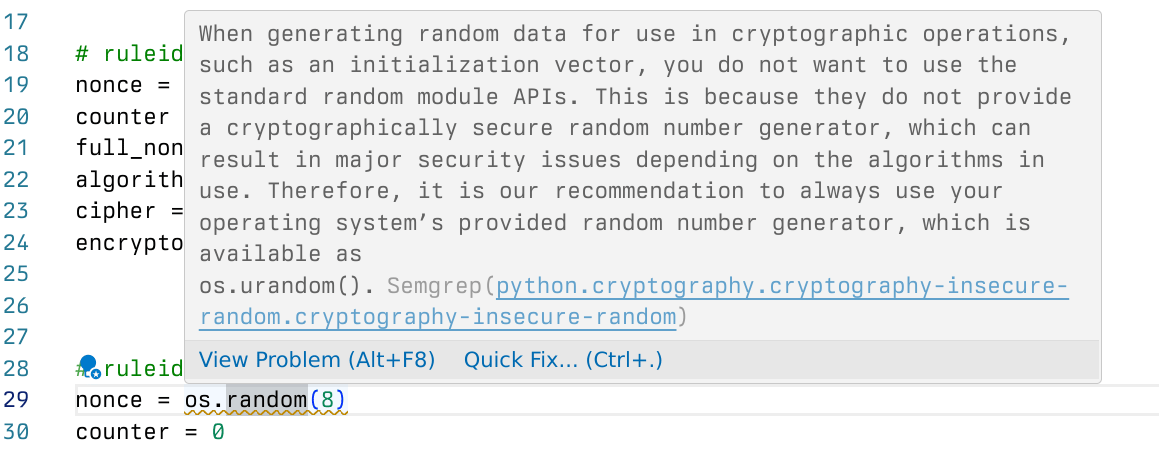
 ***Figure**. Remediation message provided in VS Code. The message appears when a user hovers over findings, which are marked with squiggly lines. Developers can click the **Quick Fix** button to either ignore the finding or, if there's a Rule-defined fix, apply the fix.*
 ### Customizability
Every organization has its own secure coding practices. Customizability ensures that the tool can adapt to the unique needs of an organization.
Semgrep provides customizability through:
* Custom rules: You can create custom rules and deploy them as guardrails. Learn more about Semgrep rule structure in [the next section](#remediation-guidance).
* Memories: this feature allows you to add and save additional context when Semgrep Multimodal provides remediation. For example, you can provide organization-specific public keys, which Semgrep Multimodal remembers.
### Remediation guidance
Remediation guidance can come in three forms:
* The rule's `message`
* AI-generated remediation guidance through Semgrep Multimodal
* The rule's `fix`
Much of the remediation guidance originates from the rule itself, which is also used to generate Semgrep Multimodal's advice (if Multimodal is enabled). Learning the basic Semgrep rule structure can help you:
* Customize remediation through your organization-specific rules.
* Writing your own rules provides you with a means to tailor Semgrep to your organization with or without Multimodal.
* Write and deploy guardrails of your own.
The following example illustrates a basic Semgrep rule.
***Figure**. A simple Semgrep rule that illustrates the common fields or keys used to create guardrails. Scroll through the **Rule** pane to view all the fields used to define the rule.*
```yaml theme={null}
rules:
# The name of the rule (required):
- id: fix-and-message-demo-copy
# The language of the target code (required):
languages:
- python
# How severe the impact of the finding is (required):
severity: HIGH
# Description and advice that appears in the IDE,
# PR or MR comment, or CLI (required):
message: >-
You're using an unsafe function.
Prefer safe_function() if possible.
# The matching logic of the rule (required):
pattern: unsafe_function(...)
# A substitution that resolves the finding (optional).
fix: safe_function(...)
# Metadata is optional but helpful to AI-generated remediation.
metadata:
# A category that describes the rule. Typically security:
category: security
# Confidence of the rule to detect true positives:
confidence: HIGH
# How likely an attacker can exploit the issue:
likelihood: HIGH
# Indicates how much damage a vulnerability can cause:
impact: HIGH
# A sub-type under category. Typically vuln, audit, or secure default:
subcategory:
- vuln
```
#### The rule `message`
This description explains **why** the finding was generated and outlines **general advice** on resolving the issue. Messages notify developers in all interfaces where you've deployed a guardrail.
#### Remediation guidance (Semgrep Multimodal)
This is a tailored, **step-by-step** outline of what a developer must change to fix the insecure code.
The guidance makes use of the Semgrep rule, AI's understanding of code, and a prompt tree that incorporates inputs such as:
* Prior triage decisions
* Custom instructions
* Broader context of the file
### Customizability
Every organization has its own secure coding practices. Customizability ensures that the tool can adapt to the unique needs of an organization.
Semgrep provides customizability through:
* Custom rules: You can create custom rules and deploy them as guardrails. Learn more about Semgrep rule structure in [the next section](#remediation-guidance).
* Memories: this feature allows you to add and save additional context when Semgrep Multimodal provides remediation. For example, you can provide organization-specific public keys, which Semgrep Multimodal remembers.
### Remediation guidance
Remediation guidance can come in three forms:
* The rule's `message`
* AI-generated remediation guidance through Semgrep Multimodal
* The rule's `fix`
Much of the remediation guidance originates from the rule itself, which is also used to generate Semgrep Multimodal's advice (if Multimodal is enabled). Learning the basic Semgrep rule structure can help you:
* Customize remediation through your organization-specific rules.
* Writing your own rules provides you with a means to tailor Semgrep to your organization with or without Multimodal.
* Write and deploy guardrails of your own.
The following example illustrates a basic Semgrep rule.
***Figure**. A simple Semgrep rule that illustrates the common fields or keys used to create guardrails. Scroll through the **Rule** pane to view all the fields used to define the rule.*
```yaml theme={null}
rules:
# The name of the rule (required):
- id: fix-and-message-demo-copy
# The language of the target code (required):
languages:
- python
# How severe the impact of the finding is (required):
severity: HIGH
# Description and advice that appears in the IDE,
# PR or MR comment, or CLI (required):
message: >-
You're using an unsafe function.
Prefer safe_function() if possible.
# The matching logic of the rule (required):
pattern: unsafe_function(...)
# A substitution that resolves the finding (optional).
fix: safe_function(...)
# Metadata is optional but helpful to AI-generated remediation.
metadata:
# A category that describes the rule. Typically security:
category: security
# Confidence of the rule to detect true positives:
confidence: HIGH
# How likely an attacker can exploit the issue:
likelihood: HIGH
# Indicates how much damage a vulnerability can cause:
impact: HIGH
# A sub-type under category. Typically vuln, audit, or secure default:
subcategory:
- vuln
```
#### The rule `message`
This description explains **why** the finding was generated and outlines **general advice** on resolving the issue. Messages notify developers in all interfaces where you've deployed a guardrail.
#### Remediation guidance (Semgrep Multimodal)
This is a tailored, **step-by-step** outline of what a developer must change to fix the insecure code.
The guidance makes use of the Semgrep rule, AI's understanding of code, and a prompt tree that incorporates inputs such as:
* Prior triage decisions
* Custom instructions
* Broader context of the file
 **INFO**
* Within developer-native interfaces, Semgrep Multimodal only appears in PR or MR comments. Remediation guidance does not appear in the IDE or `pre-commit`.
* You can adjust when remediation guidance is shown to developers based on the level of confidence in the guidance.
#### Suggested fix (Semgrep Multimodal)
When enabled, [Suggested fix](/semgrep-multimodal/overview#suggested-fix) includes suggestions on how to fix the insecure code. Suggested fix does **not** include inline code diffs. For AI-generated code changes, use [Autofix](/semgrep-code/triage-remediation/autofix) from Semgrep AppSec Platform.
#### Rule-defined fix
Sometimes a rule can resolve a finding by replacing an insecure function with a secure one. These rules make use of Semgrep's [Rule-defined fix](/writing-rules/rule-defined-fix) feature, which lets rule-writers provide a human-written deterministic fix that developers can commit directly from a pull request or merge request comment.
For AI-generated code changes that open a draft pull request or merge request, use Semgrep's [Autofix](/semgrep-code/triage-remediation/autofix) feature.
## Deploy secure guardrails
### Prerequisites
#### For AppSec engineers
* You have completed a [Semgrep core deployment](/deployment/core-deployment).
* Your [Policies](https://semgrep.dev/orgs/-/policies) page should have at least one rule.
#### For developers
* You must have a Semgrep account.
* You must have joined your Semgrep organization.
* To use Semgrep with your IDE, you must install the extension for the IDE and sign in to Semgrep through the extension.
* To use Semgrep with `pre-commit`, you must install and set up `pre-commit`, then sign in to Semgrep through the CLI.
Rules can be **configured on a per-product, per-interface basis** to notify developers when a finding from that rule is detected. The customization enables you to manage the amount of notifications a developer may receive. The following table describes how to deploy guardrails for each product and interface:
| Interface | Semgrep Code | Semgrep Secrets | Semgrep Supply Chain |
| :----------------------- | :---------------------------------------------------------------------------------------------------------------------------------------------- | :---------------------------------------------------------------------------------------------------------------------------------------------- | :---------------------------------------------------------------------------------------------- |
| IDE | To notify developers of findings from a rule, add the rule to your Policies. | To notify developers of findings from a rule, add the rule to your Policies. | Coming soon |
| PR or MR comments | To notify developers, a rule must be in Comment mode; you can configure your Policies to include only **high confidence, high severity rules**. | To notify developers, a rule must be in Comment mode; you can configure your Policies to include only **high confidence, high severity rules**. | Developers receive comments about any **reachable vulnerability of high or critical severity.** |
| CLI through `pre-commit` | To notify developers of findings from a rule, add the rule to your Policies. | To notify developers of findings from a rule, add the rule to your Policies. | Developers are notified of **all** findings by default. |
## Next steps
* Learn about [secure defaults and their implementation in Semgrep](/secure-guardrails/secure-defaults).
* Create custom rules that you can [deploy as guardrails](/secure-guardrails/custom-guardrails-rules).
**INFO**
* Within developer-native interfaces, Semgrep Multimodal only appears in PR or MR comments. Remediation guidance does not appear in the IDE or `pre-commit`.
* You can adjust when remediation guidance is shown to developers based on the level of confidence in the guidance.
#### Suggested fix (Semgrep Multimodal)
When enabled, [Suggested fix](/semgrep-multimodal/overview#suggested-fix) includes suggestions on how to fix the insecure code. Suggested fix does **not** include inline code diffs. For AI-generated code changes, use [Autofix](/semgrep-code/triage-remediation/autofix) from Semgrep AppSec Platform.
#### Rule-defined fix
Sometimes a rule can resolve a finding by replacing an insecure function with a secure one. These rules make use of Semgrep's [Rule-defined fix](/writing-rules/rule-defined-fix) feature, which lets rule-writers provide a human-written deterministic fix that developers can commit directly from a pull request or merge request comment.
For AI-generated code changes that open a draft pull request or merge request, use Semgrep's [Autofix](/semgrep-code/triage-remediation/autofix) feature.
## Deploy secure guardrails
### Prerequisites
#### For AppSec engineers
* You have completed a [Semgrep core deployment](/deployment/core-deployment).
* Your [Policies](https://semgrep.dev/orgs/-/policies) page should have at least one rule.
#### For developers
* You must have a Semgrep account.
* You must have joined your Semgrep organization.
* To use Semgrep with your IDE, you must install the extension for the IDE and sign in to Semgrep through the extension.
* To use Semgrep with `pre-commit`, you must install and set up `pre-commit`, then sign in to Semgrep through the CLI.
Rules can be **configured on a per-product, per-interface basis** to notify developers when a finding from that rule is detected. The customization enables you to manage the amount of notifications a developer may receive. The following table describes how to deploy guardrails for each product and interface:
| Interface | Semgrep Code | Semgrep Secrets | Semgrep Supply Chain |
| :----------------------- | :---------------------------------------------------------------------------------------------------------------------------------------------- | :---------------------------------------------------------------------------------------------------------------------------------------------- | :---------------------------------------------------------------------------------------------- |
| IDE | To notify developers of findings from a rule, add the rule to your Policies. | To notify developers of findings from a rule, add the rule to your Policies. | Coming soon |
| PR or MR comments | To notify developers, a rule must be in Comment mode; you can configure your Policies to include only **high confidence, high severity rules**. | To notify developers, a rule must be in Comment mode; you can configure your Policies to include only **high confidence, high severity rules**. | Developers receive comments about any **reachable vulnerability of high or critical severity.** |
| CLI through `pre-commit` | To notify developers of findings from a rule, add the rule to your Policies. | To notify developers of findings from a rule, add the rule to your Policies. | Developers are notified of **all** findings by default. |
## Next steps
* Learn about [secure defaults and their implementation in Semgrep](/secure-guardrails/secure-defaults).
* Create custom rules that you can [deploy as guardrails](/secure-guardrails/custom-guardrails-rules).