> ## Documentation Index
> Fetch the complete documentation index at: https://docs.semgrep.dev/llms.txt
> Use this file to discover all available pages before exploring further.
# Supply Chain incident notifications and response
> Get notifications in Slack when Semgrep declares a new Supply Chain incident, learn whether it affects your projects, and respond.
Semgrep's Security Research team monitors the open source ecosystem and responds in real time when a package is compromised, publishing an [Advisory](/semgrep-supply-chain/advisories) as soon as an incident is confirmed.
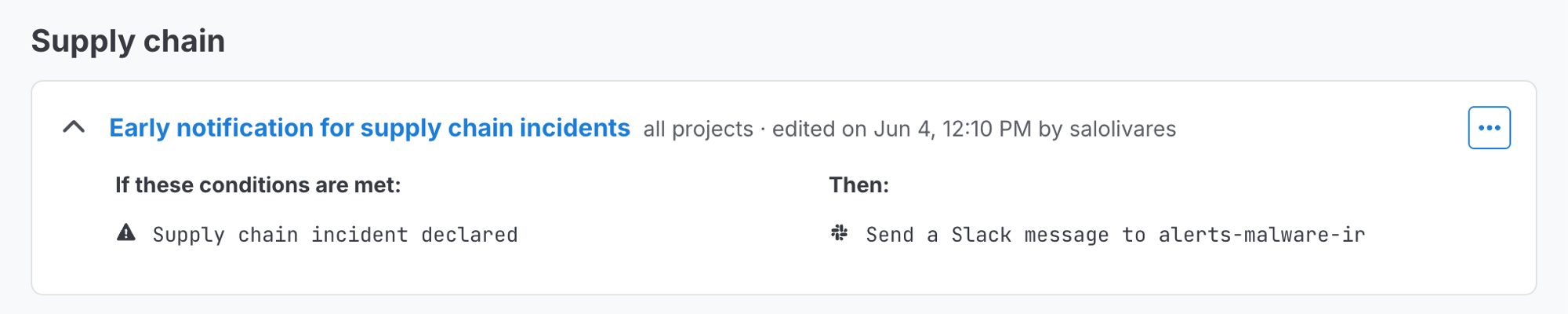
If you've configured the **Early notification for Supply Chain incidents** policy, Semgrep automatically posts to a Slack channel of your choosing within minutes of declaring the incident. You don't have to look for the news yourself: Semgrep checks the compromised package versions against your projects' most recent dependency data and tells you whether any of them are affected in the same notification.
You are notified every time Semgrep declares a new supply chain incident, whether or not any of your projects use the affected packages.
## Prerequisites
Ensure that:
* You have enabled [Slack notifications from Semgrep](/semgrep-appsec-platform/slack-notifications).
* Your organization uses [Unified Policies](/semgrep-appsec-platform/unified-policies/overview).
## Set up incident notifications
 In your Slack workspace, find or create a channel for Semgrep notifications. Then, run `/semgrep_add_channel` in the channel to make it available to your policies. See [Receive Slack notifications](/semgrep-appsec-platform/slack-notifications#set-up-notifications-for-findings-in-slack) for more information.
In Semgrep AppSec Platform, go to **Rules & Policies > Policies**.
Find the policy named **Early notification for Supply Chain incidents**. Click its ** icon**, then select **Edit policy**.
Go to **Actions**. Click **Add action > Send a Slack message**, and select the Slack channel you configured at the beginning of the setup process.
Click **Update**.
You will be redirected back to the **Remediation** policies page. Click the policy's ** icon**, then select **Enable policy**.
## What to do during an incident
Every notification includes a **View incident advisories** button that takes you to the [Advisories](/semgrep-supply-chain/advisories) page, filtered to that incident. A **View blog post** button appears when Semgrep has published a blog post about the incident.
Click **View incident advisories** to see the list of related advisories, including compromised packages and versions.
If your notification lists affected projects, [initiate a scan](/kb/semgrep-supply-chain/incident-response#3-initiate-scans-on-potentially-affected-projects-with-semgrep-rules) on them to confirm and get up-to-date findings.
Remove or upgrade any compromised dependencies you find, then re-scan to confirm the findings clear. See [Detect and remove malicious dependencies](/semgrep-supply-chain/malicious-dependencies#triage-and-remediation-for-malicious-dependencies) for remediation guidance.
## Related reading
In your Slack workspace, find or create a channel for Semgrep notifications. Then, run `/semgrep_add_channel` in the channel to make it available to your policies. See [Receive Slack notifications](/semgrep-appsec-platform/slack-notifications#set-up-notifications-for-findings-in-slack) for more information.
In Semgrep AppSec Platform, go to **Rules & Policies > Policies**.
Find the policy named **Early notification for Supply Chain incidents**. Click its ** icon**, then select **Edit policy**.
Go to **Actions**. Click **Add action > Send a Slack message**, and select the Slack channel you configured at the beginning of the setup process.
Click **Update**.
You will be redirected back to the **Remediation** policies page. Click the policy's ** icon**, then select **Enable policy**.
## What to do during an incident
Every notification includes a **View incident advisories** button that takes you to the [Advisories](/semgrep-supply-chain/advisories) page, filtered to that incident. A **View blog post** button appears when Semgrep has published a blog post about the incident.
Click **View incident advisories** to see the list of related advisories, including compromised packages and versions.
If your notification lists affected projects, [initiate a scan](/kb/semgrep-supply-chain/incident-response#3-initiate-scans-on-potentially-affected-projects-with-semgrep-rules) on them to confirm and get up-to-date findings.
Remove or upgrade any compromised dependencies you find, then re-scan to confirm the findings clear. See [Detect and remove malicious dependencies](/semgrep-supply-chain/malicious-dependencies#triage-and-remediation-for-malicious-dependencies) for remediation guidance.
## Related reading