> ## Documentation Index
> Fetch the complete documentation index at: https://docs.semgrep.dev/llms.txt
> Use this file to discover all available pages before exploring further.
# Upgrade guidance and Autofix (beta)
**Upgrade guidance** uses program analysis and AI to analyze the results of your Semgrep Supply Chain scans to see if you can safely and reliably update a vulnerable package or dependency to a fixed version. From there, you can choose to:
* Use **Autofix** and have Semgrep open a pull request (PR) or merge request (MR) that updates the dependency to a fixed version. If the update is a breaking change, Semgrep provides guidance on how to handle it in the PR or MR description.
* Create a Jira ticket to track further work on the finding.
* Set the finding's triage status as **To fix**
## Prerequisites
Upgrade guidance and Autofix are supported for:
* **JavaScript** projects
* **Python** projects that use the following package managers:
* `pip`
* `pip-tools`
* `pipenv`
* `poetry`
* `uv`
You must use one of the following source code managers:
* GitHub Cloud
* GitLab Cloud
Upgrade guidance and Autofix support:
* Public `npm` and PyPI registries
* Private PyPI registries
### Feature availability
To access **all** Upgrade guidance and Autofix features, you must have:
* Enabled Upgrade guidance in Semgrep AppSec Platform by going to [**Settings > General > Supply Chain**](https://semgrep.dev/orgs/-/settings/general/supplyChain), then clicking the **Upgrade guidance & Autofix** toggle.
* At least one repository with [full Semgrep Supply Chain scans](/semgrep-supply-chain/set-up-and-configure).
* Semgrep Multimodal [enabled](/semgrep-multimodal/getting-started).
* Granted Semgrep **Read and write** access to your repository. See [Grant read and write access](/semgrep-appsec-platform/scm-code-access).
* **GitHub users** must have the *private* GitHub app for Semgrep installed. The app must grant [**Read and write** access for the **Contents** scope](#grant-read-and-write-access-to-a-private-github-semgrep-app) to open Autofix PRs. Existing customers must manually enable this permission if they have not already done so.
* Autofix PRs for Supply Chain use the same private GitHub App **Contents: Read and write** permission as [Autofix for Semgrep Code](/semgrep-code/triage-remediation/autofix). See [Grant code access to Semgrep with a private GitHub app](/semgrep-appsec-platform/scm-code-access#grant-code-access-to-semgrep-with-a-private-github-app) for setup steps. For GitHub Autofix API details, see [Autofix permissions](/deployment/prepare/scm-permissions#autofix-github-permissions).
* Optionally: if you have [a private registry, connect it to Semgrep](#connect-a-private-registry-to-semgrep) to improve results.
The following table summarizes the features available to you depending on the prerequisites you meet:
| Semgrep features available | [Read and write access on the `contents` scope granted](#grant-read-and-write-access-to-a-private-github-semgrep-app) | [Code access granted to Semgrep through installation of the private GitHub app](/deployment/managed-scanning/github#permissions) | [Semgrep Multimodal enabled](/semgrep-multimodal/getting-started) | [Private registry connected to Semgrep](#connect-a-private-registry-to-semgrep) | |
| :----------------------------------------------------------------------------------------------------------------------------------------------------------------------------------------------------------------------------------------------------------------------------------------------------------------------------------------------------------------------------------------------------------------------------------------------------------------------------------------------------------------------------------------------------------------------------------------------------------------------------------------------------------------------------------------------------------------------------------------------------------------------------------------------------------- | :-------------------------------------------------------------------------------------------------------------------- | :------------------------------------------------------------------------------------------------------------------------------- | :---------------------------------------------------------------- | :----------------------------------------------------------------------------------------------------- | -------------------------------------- |
| All Autofix and Upgrade guidance features, including:- Upgrade filter for Findings
- Upgrade guidance on the Finding Details page
- Coupled or blocked upgrade information shown on the Finding Details page
- Ability to open a PR to upgrade
| | | | | |
| All Autofix and Upgrade guidance features, but not for dependencies in a private registry:- Upgrade filter for Findings
- Upgrade guidance on the Finding Details page
- Coupled or blocked upgrade information shown on the Finding Details page
- Ability to open a PR to upgrade
| | | | The private registry is not connected to Semgrep | |
| Autofix, but not for dependencies in a private registry: - Ability to open a PR to upgrade
| | | | The private registry is not connected to Semgrep | |
| All Upgrade guidance features, including:- Upgrade filter for Findings
- Upgrade guidance on the Finding Details page
- Coupled or blocked upgrade information shown on the Finding Details page
| | | | | |
| All Upgrade guidance features, but not for dependencies in a private registry:- Upgrade filter for Findings
- Upgrade guidance on the Finding Details page
- Coupled or blocked upgrade information shown on the Finding Details page
| | | | The private registry is not connected to Semgrep | |
## How Upgrade guidance works
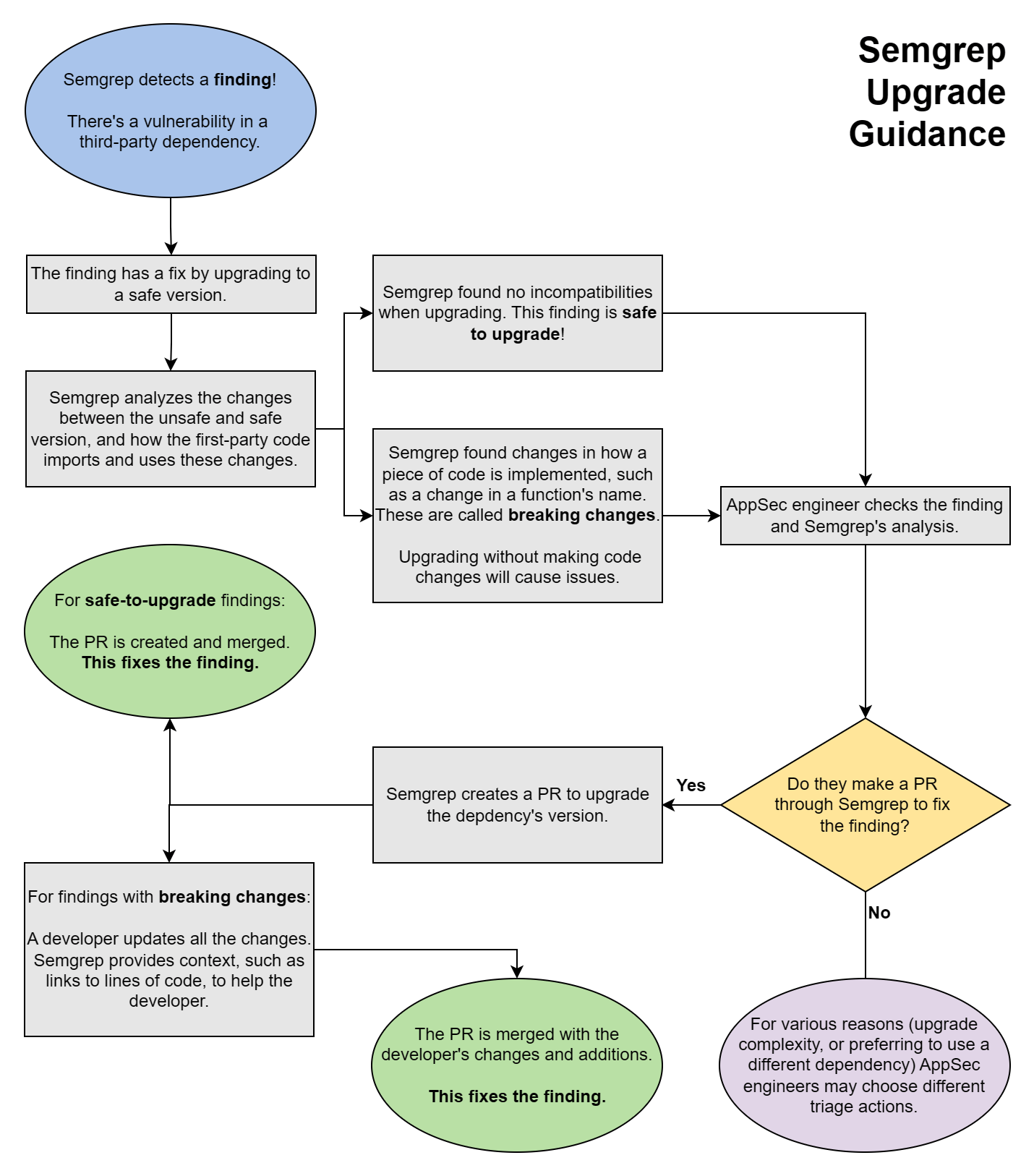
After you turn on Upgrade guidance, Semgrep performs post-scan analysis on your existing results and marks applicable findings as either **Safe to upgrade** or with **Breaking changes**.
* This analysis is performed after every **full scan**.
* Only findings with dependencies that have **fixed versions** that resolve the vulnerability are marked by Semgrep as **Safe to upgrade** or with **Breaking changes**.
* Findings without any fixed versions say **no patch available**. They do not have a badge.
The following chart illustrates the steps Semgrep performs, from scanning to analysis, and the actions you can take based on the advice it provides.
 ## Review a finding's Upgrade guidance
To view detailed information about a finding in Semgrep AppSec Platform, use the **navigation bar** to go to the **Supply Chain** page. Click the finding to open its **Details** page.
The **Details** page is divided into several panels:
* General information:
* The name of the package and a description of the finding
* Its reachability, whether it is direct or transitive, its CVE number, EPSS, and severity
* Its remediation version, if any
* Links to references
* A badge indicating if it can cause breaking changes or not (beta)
* Branch and finding history information
* Branches where the finding appears
* Where it was first detected
* AI analysis, if available
* Graphs and code:
* **Your code**: the source file in which a match was detected; the highlight indicates where the match was found
* **Dependency path**: displays the path of dependencies; useful when analyzing transitive dependencies
* **Pattern** and **Rule**: the pattern and rule logic that determined the match
## Open a PR or MR with fixes
After reviewing a finding's Upgrade guidance, you can open a pull request or merge request to upgrade the dependency to a safe version:
Go to the finding's **Details** page.
Click **Fix** > **Open Autofix PR**.
The newly created PR or MR includes the following:
* The lockfile or manifest file changes needed to upgrade the dependency.
* The context necessary for developers to fix potentially breaking changes in the PR or MR's description. This includes:
* A summary including the severity and reachability of the finding and the specific version of the dependency that the PR upgrades to.
* Vulnerability details, including a description of the vulnerability and links to its CVE references.
* Upgrade guidance that includes the files and functions in the code that make use of the dependency and might include breaking changes.
* Dependency references, such as release notes, changelogs, and commits of the dependency, which might be helpful to resolve the breaking changes.
## Review a finding's Upgrade guidance
To view detailed information about a finding in Semgrep AppSec Platform, use the **navigation bar** to go to the **Supply Chain** page. Click the finding to open its **Details** page.
The **Details** page is divided into several panels:
* General information:
* The name of the package and a description of the finding
* Its reachability, whether it is direct or transitive, its CVE number, EPSS, and severity
* Its remediation version, if any
* Links to references
* A badge indicating if it can cause breaking changes or not (beta)
* Branch and finding history information
* Branches where the finding appears
* Where it was first detected
* AI analysis, if available
* Graphs and code:
* **Your code**: the source file in which a match was detected; the highlight indicates where the match was found
* **Dependency path**: displays the path of dependencies; useful when analyzing transitive dependencies
* **Pattern** and **Rule**: the pattern and rule logic that determined the match
## Open a PR or MR with fixes
After reviewing a finding's Upgrade guidance, you can open a pull request or merge request to upgrade the dependency to a safe version:
Go to the finding's **Details** page.
Click **Fix** > **Open Autofix PR**.
The newly created PR or MR includes the following:
* The lockfile or manifest file changes needed to upgrade the dependency.
* The context necessary for developers to fix potentially breaking changes in the PR or MR's description. This includes:
* A summary including the severity and reachability of the finding and the specific version of the dependency that the PR upgrades to.
* Vulnerability details, including a description of the vulnerability and links to its CVE references.
* Upgrade guidance that includes the files and functions in the code that make use of the dependency and might include breaking changes.
* Dependency references, such as release notes, changelogs, and commits of the dependency, which might be helpful to resolve the breaking changes.