> ## Documentation Index
> Fetch the complete documentation index at: https://docs.semgrep.dev/llms.txt
> Use this file to discover all available pages before exploring further.
# Upgrade Guidance (beta)
> Use Upgrade Guidance to identify safe dependency upgrades and understand potential breaking changes.
Upgrade Guidance is in **beta**. Beta features are subject to change with continued internal benchmarking and customer feedback.
Upgrade Guidance analyzes Semgrep Supply Chain findings to determine whether a vulnerable dependency can be upgraded to a fixed version without breaking your code.
## Enable Upgrade Guidance
Upgrade Guidance is available for JavaScript or Python projects on GitHub Cloud or GitLab Cloud.
[Enable Semgrep Multimodal](/semgrep-multimodal/getting-started).
In Semgrep AppSec Platform, go to [**Settings > General > Supply Chain**](https://semgrep.dev/orgs/-/settings/general/supplyChain) and turn on **Upgrade Guidance**.
Run a [full Semgrep Supply Chain scan](/semgrep-supply-chain/set-up-and-configure).
If your project uses a private registry, [connect it to Semgrep](/kb/semgrep-supply-chain/connect-a-private-registry) so dependency resolution can complete.
## Review Upgrade Guidance
In Semgrep AppSec Platform, go to [**Supply Chain**](https://semgrep.dev/orgs/-/supply-chain).
Select a finding.
Review the upgrade information on the finding's **Details** page.
### Upgrade results
| Result | Meaning |
| :--------------------- | :----------------------------------------------------------------------------------- |
| **Safe to upgrade** | A fixed version is available and Semgrep did not identify breaking changes. |
| **Breaking changes** | A fixed version is available, but the upgrade might require additional code changes. |
| **No patch available** | The dependency does not have a fixed version. |
| No guidance displayed | The finding is not eligible or Semgrep could not complete dependency resolution. |
## How Upgrade Guidance works
After each full Supply Chain scan, Semgrep analyzes eligible findings and labels them based on the available upgrade.
To verify an upgrade, Semgrep runs the package manager's dependency resolver against the project manifest. This allows Semgrep to:
* Confirm that a fixed version can be installed.
* Identify dependencies that must be upgraded together.
* Detect code that might be affected by breaking changes.
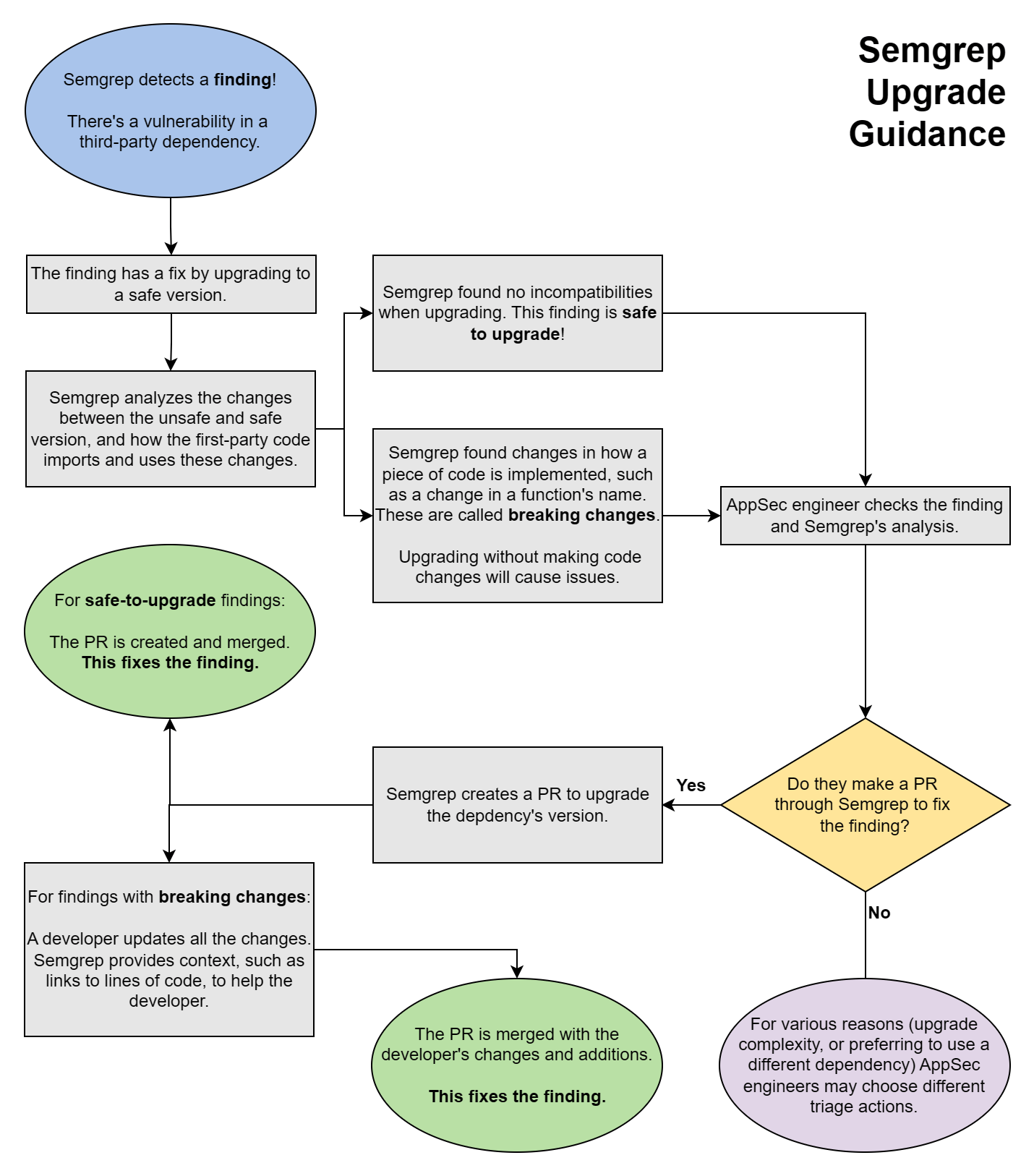
The following chart illustrates the Upgrade Guidance workflow.
 ## Why Upgrade Guidance might not appear
### The dependency has no fixed version
Only findings with a fixed version are eligible for Upgrade Guidance. If no fixed version exists, the finding displays **No patch available**.
### The manifest contains inaccessible private packages
Dependency resolution requires metadata for every package in the manifest. If Semgrep cannot access one of the private packages, it cannot verify the upgrade.
This limitation applies to the entire manifest. One inaccessible private package can prevent Upgrade Guidance from appearing for other findings in the same manifest or lockfile, including findings involving public packages.
To give Semgrep access, [connect your private registry](/kb/semgrep-supply-chain/connect-a-private-registry).
## Remediate the finding
After reviewing the guidance, you can upgrade the dependency manually, create a Jira ticket, or set the finding's triage status to **To fix**.
To open a PR or MR instead, see [Supply Chain Autofix](/semgrep-supply-chain/autofix). You do not need to wait for Upgrade Guidance analysis to finish before using Autofix.
## Why Upgrade Guidance might not appear
### The dependency has no fixed version
Only findings with a fixed version are eligible for Upgrade Guidance. If no fixed version exists, the finding displays **No patch available**.
### The manifest contains inaccessible private packages
Dependency resolution requires metadata for every package in the manifest. If Semgrep cannot access one of the private packages, it cannot verify the upgrade.
This limitation applies to the entire manifest. One inaccessible private package can prevent Upgrade Guidance from appearing for other findings in the same manifest or lockfile, including findings involving public packages.
To give Semgrep access, [connect your private registry](/kb/semgrep-supply-chain/connect-a-private-registry).
## Remediate the finding
After reviewing the guidance, you can upgrade the dependency manually, create a Jira ticket, or set the finding's triage status to **To fix**.
To open a PR or MR instead, see [Supply Chain Autofix](/semgrep-supply-chain/autofix). You do not need to wait for Upgrade Guidance analysis to finish before using Autofix.