> ## Documentation Index
> Fetch the complete documentation index at: https://docs.semgrep.dev/llms.txt
> Use this file to discover all available pages before exploring further.
# Join mode overview
> Join mode runs several Semgrep rules at once and only returns results if certain conditions on the results are met. Join mode is an experimental mode that lets you cross file boundaries, allowing you to write rules for whole code bases instead of individual files. As the name implies, this was inspired by join clauses in SQL queries.
Think of join mode like this: distinct Semgrep rules are used to gather information about a code base. Then, the conditions you define are used to select specific results from these rules, and the selected results are reported by Semgrep. You can join results on metavariable contents or on the result's file path.
**INFO**
You can also use cross-file (interfile) analysis. For more information, see [ Perform cross-file analysis](/semgrep-code/semgrep-pro-engine-intro). Cross-file analysis is preferred over join mode where either of the two are feasible. Neither is currently available in Semgrep Community Edition (CE).
## Example
Here’s an example join mode rule that detects a cross-site scripting (XSS) vulnerability with high precision.
```yaml expandable theme={null}
rules:
- id: flask-likely-xss
mode: join
join:
refs:
- rule: flask-user-input.yaml
as: user-input
- rule: unescaped-template-extension.yaml
as: unescaped-extensions
- rule: any-template-var.yaml
renames:
- from: '$...EXPR'
to: '$VAR'
as: template-vars
on:
- 'user-input.$VAR == unescaped-extensions.$VALUE'
- 'unescaped-extensions.$VAR == template-vars.$VAR'
- 'unescaped-extensions.$PATH > template-vars.path'
message: |
Detected a XSS vulnerability: '$VAR' is rendered
unsafely in '$PATH'.
severity: HIGH
```
Let's explore how this works. First, some background on the vulnerability. Second, we'll walk through the join mode rule.
**Vulnerability background**
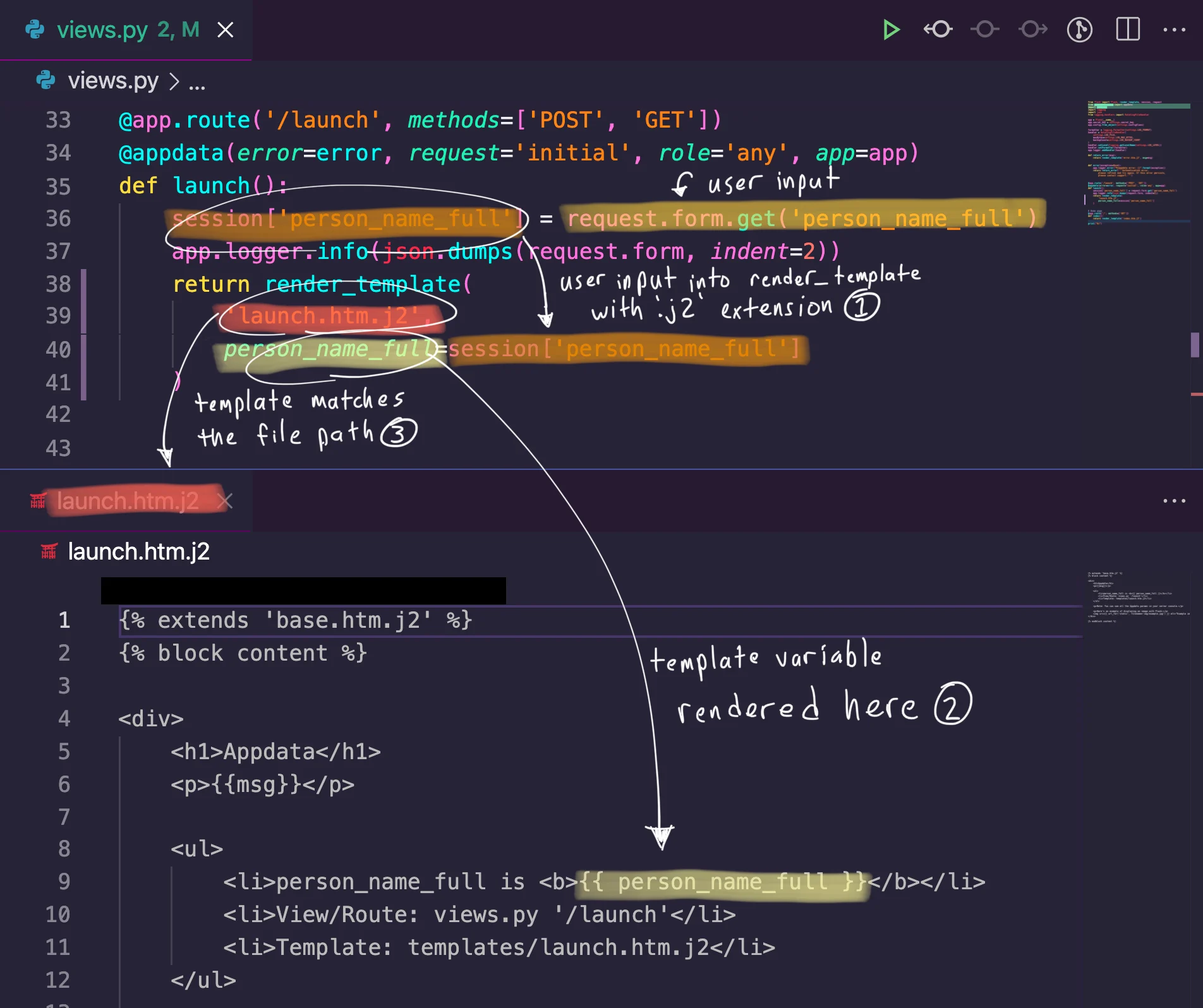
In Flask, templates are only HTML-escaped if the [template file ends with the `.html` extension](https://flask.palletsprojects.com/en/2.0.x/templating/#jinja-setup). Therefore, detecting these two conditions present in a Flask application is a high indicator of
1. User input directly enters a template without the `.html` extension
2. The user input is directly rendered in the template
**Join mode rule explanation**
Now, let's turn these conditions into the join mode rule. We need to find three code patterns:
1. User input
2. Templates without the `.html` extension
3. Variables rendered in a template
We can write individual Semgrep rules for each of these code patterns.
```yaml theme={null}
rules:
- id: flask-user-input
languages: [python]
severity: LOW
message: $VAR
pattern: '$VAR = flask.request.$SOMETHING.get(...)'
```
```yaml theme={null}
rules:
- id: unescaped-template-extension
message: |
Flask does not automatically escape Jinja templates unless they have
.html as an extension. This could lead to XSS attacks.
patterns:
- pattern: flask.render_template("$PATH", ..., $VAR=$VALUE, ...)
- metavariable-pattern:
metavariable: $PATH
language: generic
patterns:
- pattern-not-regex: .*\.html$
languages: [python]
severity: MEDIUM
```
```yaml theme={null}
rules:
- id: any-template-var
languages: [generic]
severity: LOW
message: '$...EXPR'
pattern: '{{ $...EXPR }}'
```
Finally, we want to "join" the results from these together. Below are the join conditions, in plain language.
1. The variable `$VAR` from `flask-user-input` has the same content as the value `$VALUE` from `unescaped-template-extension`
2. The keyword argument `$VAR` from `unescaped-template-extension` has the same content as `$...EXPR` from `any-template-var`
3. The template file name `$PATH` from `unescaped-template-extension` is a substring of the file path of a result from `any-template-var`
We can translate these roughly into the following condition statements.
```
- 'user-input.$VAR == unescaped-extensions.$VALUE'
- 'unescaped-extensions.$VAR == template-vars.$VAR'
- 'unescaped-extensions.$PATH > template-vars.path'
```
Combining the three code pattern Semgrep rules and the three conditions gives us the join rule at the top of this section. This rule matches the code displayed below.
 ```bash theme={null}
> semgrep -f flask-likely-xss.yaml
running 1 rules...
running 3 rules...
ran 3 rules on 16 files: 14 findings
matching...
matching done.
./templates/launch.htm.j2
severity:error rule:flask-likely-xss: Detected a XSS vulnerability: '$VAR' is rendered unsafely in '$PATH'.
9: person_name_full is {{ person_name_full }}
```
**Helpers**
For convenience, when writing a join mode rule, you can use the `renames` and `as` keys.
The `renames` key lets you rename metavariables from one rule to something else in your conditions. **This is necessary for named expressions, e.g., `$...EXPR`.**
The `as` key behaves similarly to `AS` clauses in SQL. This lets you rename the result set for use in the conditions. If the `as` key is not specified, the result set uses the **rule ID**.
## Syntax
### `join`
The `join` key is required when in join mode. This is just a top-level key that groups the join rule parts together.
#### Inline rule example
The following rule attempts to detect cross-site scripting in a Flask application by checking whether a template variable is rendered unsafely through Python code.
```yaml expandable theme={null}
rules:
- id: flask-likely-xss
mode: join
join:
rules:
- id: user-input
pattern: |
$VAR = flask.request.$SOMETHING.get(...)
languages: [python]
- id: unescaped-extensions
languages: [python]
patterns:
- pattern: |
flask.render_template("$TEMPLATE", ..., $KWARG=$VAR, ...)
- metavariable-pattern:
metavariable: $TEMPLATE
language: generic
patterns:
- pattern-not-regex: .*\.html$
- id: template-vars
languages: [generic]
pattern: |
{{ $VAR }}
on:
- 'user-input.$VAR == unescaped-extensions.$VAR'
- 'unescaped-extensions.$KWARG == template-vars.$VAR'
- 'unescaped-extensions.$TEMPLATE < template-vars.path'
message: |
Detected a XSS vulnerability: '$VAR' is rendered
unsafely in '$TEMPLATE'.
severity: HIGH
```
The required fields under the `rules` key are the following:
* `id`
* `languages`
* A set of `pattern` clauses.
The optional fields under the `rules` key are the following:
* `message`
* `severity`
**NOTE**
Refer to the metavariables captured by the rule in the `on` conditions by the rule `id`. For inline rules, aliases do **not** work.
### `refs`
Short for references, `refs` is a list of external rules that make up your code patterns. Each entry in `refs` is an object with the required key `rule` and optional keys `renames` and `as`.
### `rule`
Used with `refs`, `rule` points to an external rule location to use in this join rule. Even though Semgrep rule files can typically contain multiple rules under the `rules` key, join mode **only uses the first rule in the provided file**.
Anything that works with `semgrep --config ` also works as the value for `rule`.
### `renames`
An optional key for an object in `refs`, `renames` renames the metavariables from the associated `rule`. The value of `renames` is a list of objects whose keys are `from` and `to`. The `from` key specifies the metavariable to rename, and the `to` key specifies the new name of the metavariable.
**WARNING**
Renaming is necessary for named expressions, e.g., `$...EXPR`.
### `as`
An optional key for an object in `refs`, `as` lets you specify an alias for the results collected by this rule for use in the `on` conditions. Without the `as` key, the default name for the results collected by this rule is the rule ID of the rule in `rule`. If you use `as`, the results can be referenced using the alias specified by `as`.
### `on`
The `on` key is required in join mode. This is where the join conditions are listed. The value of `on` is a list of strings which have the format:
```
. .
```
`result_set` is the name of the result set produced by one of the `refs`. See the `as` key for more information.
`property` is either a metavariable, such as `$VAR`, or the keyword `path`, which returns the path of the finding.
`operator` is one of the following.
| Operator | Example | Description |
| -------- | --------------------------------------------------- | ---------------------------------------------------------------------- |
| `==` | `secret-env-var.$VALUE == log-statement.$FORMATVAR` | Matches when the contents of both sides are exactly equal. |
| `!=` | `url-allowlist.$URL != get-request.$URL` | Matches when the contents of both sides are not equal. |
| `<` | `template-var.path < unsafe-template.$PATH` | Matches when the right-hand side is a substring of the left-hand side. |
| `>` | `unsafe-template.$PATH > template-var.path` | Matches when the left-hand side is a substring of the right-hand side. |
## Limitations
Join mode **is not taint mode**! While it can look on the surface like join mode is "connecting" things together, it is actually just creating sets for each Semgrep rule and returning all the results that meet the conditions. This means some false positives will occur if unrelated metavariable contents happen to have the same value.
To use join mode with `refs`, you must define your individual Semgrep rules in independent locations. This can be anything that works with `semgrep --config `, such as a file, a URL, or a Semgrep registry pointer like `r/java.lang.security.some.rule.id`.
Join mode requires login, and does not work in the Semgrep Playground or Semgrep Editor, as it is an experimental feature.
Currently, join mode only reports the code location of the **last finding that matches the conditions**. Join mode parses the conditions from top-to-bottom, left-to-right. This means that findings from the "bottom-right" condition become the reported code location.
## More ideas
Join mode effectively lets you ask questions of entire code bases. Here are some examples of the kinds of questions you can use join mode to answer.
* Do any of my dependencies use `dangerouslySetInnerHTML`, and do I directly import that dependency?
* Does a key in this JSON file have a dangerous value, and do I load this JSON file and use the key in a dangerous function?
* Is an unsafe variable rendered in an HTML template?
```bash theme={null}
> semgrep -f flask-likely-xss.yaml
running 1 rules...
running 3 rules...
ran 3 rules on 16 files: 14 findings
matching...
matching done.
./templates/launch.htm.j2
severity:error rule:flask-likely-xss: Detected a XSS vulnerability: '$VAR' is rendered unsafely in '$PATH'.
9: person_name_full is {{ person_name_full }}
```
**Helpers**
For convenience, when writing a join mode rule, you can use the `renames` and `as` keys.
The `renames` key lets you rename metavariables from one rule to something else in your conditions. **This is necessary for named expressions, e.g., `$...EXPR`.**
The `as` key behaves similarly to `AS` clauses in SQL. This lets you rename the result set for use in the conditions. If the `as` key is not specified, the result set uses the **rule ID**.
## Syntax
### `join`
The `join` key is required when in join mode. This is just a top-level key that groups the join rule parts together.
#### Inline rule example
The following rule attempts to detect cross-site scripting in a Flask application by checking whether a template variable is rendered unsafely through Python code.
```yaml expandable theme={null}
rules:
- id: flask-likely-xss
mode: join
join:
rules:
- id: user-input
pattern: |
$VAR = flask.request.$SOMETHING.get(...)
languages: [python]
- id: unescaped-extensions
languages: [python]
patterns:
- pattern: |
flask.render_template("$TEMPLATE", ..., $KWARG=$VAR, ...)
- metavariable-pattern:
metavariable: $TEMPLATE
language: generic
patterns:
- pattern-not-regex: .*\.html$
- id: template-vars
languages: [generic]
pattern: |
{{ $VAR }}
on:
- 'user-input.$VAR == unescaped-extensions.$VAR'
- 'unescaped-extensions.$KWARG == template-vars.$VAR'
- 'unescaped-extensions.$TEMPLATE < template-vars.path'
message: |
Detected a XSS vulnerability: '$VAR' is rendered
unsafely in '$TEMPLATE'.
severity: HIGH
```
The required fields under the `rules` key are the following:
* `id`
* `languages`
* A set of `pattern` clauses.
The optional fields under the `rules` key are the following:
* `message`
* `severity`
**NOTE**
Refer to the metavariables captured by the rule in the `on` conditions by the rule `id`. For inline rules, aliases do **not** work.
### `refs`
Short for references, `refs` is a list of external rules that make up your code patterns. Each entry in `refs` is an object with the required key `rule` and optional keys `renames` and `as`.
### `rule`
Used with `refs`, `rule` points to an external rule location to use in this join rule. Even though Semgrep rule files can typically contain multiple rules under the `rules` key, join mode **only uses the first rule in the provided file**.
Anything that works with `semgrep --config ` also works as the value for `rule`.
### `renames`
An optional key for an object in `refs`, `renames` renames the metavariables from the associated `rule`. The value of `renames` is a list of objects whose keys are `from` and `to`. The `from` key specifies the metavariable to rename, and the `to` key specifies the new name of the metavariable.
**WARNING**
Renaming is necessary for named expressions, e.g., `$...EXPR`.
### `as`
An optional key for an object in `refs`, `as` lets you specify an alias for the results collected by this rule for use in the `on` conditions. Without the `as` key, the default name for the results collected by this rule is the rule ID of the rule in `rule`. If you use `as`, the results can be referenced using the alias specified by `as`.
### `on`
The `on` key is required in join mode. This is where the join conditions are listed. The value of `on` is a list of strings which have the format:
```
. .
```
`result_set` is the name of the result set produced by one of the `refs`. See the `as` key for more information.
`property` is either a metavariable, such as `$VAR`, or the keyword `path`, which returns the path of the finding.
`operator` is one of the following.
| Operator | Example | Description |
| -------- | --------------------------------------------------- | ---------------------------------------------------------------------- |
| `==` | `secret-env-var.$VALUE == log-statement.$FORMATVAR` | Matches when the contents of both sides are exactly equal. |
| `!=` | `url-allowlist.$URL != get-request.$URL` | Matches when the contents of both sides are not equal. |
| `<` | `template-var.path < unsafe-template.$PATH` | Matches when the right-hand side is a substring of the left-hand side. |
| `>` | `unsafe-template.$PATH > template-var.path` | Matches when the left-hand side is a substring of the right-hand side. |
## Limitations
Join mode **is not taint mode**! While it can look on the surface like join mode is "connecting" things together, it is actually just creating sets for each Semgrep rule and returning all the results that meet the conditions. This means some false positives will occur if unrelated metavariable contents happen to have the same value.
To use join mode with `refs`, you must define your individual Semgrep rules in independent locations. This can be anything that works with `semgrep --config `, such as a file, a URL, or a Semgrep registry pointer like `r/java.lang.security.some.rule.id`.
Join mode requires login, and does not work in the Semgrep Playground or Semgrep Editor, as it is an experimental feature.
Currently, join mode only reports the code location of the **last finding that matches the conditions**. Join mode parses the conditions from top-to-bottom, left-to-right. This means that findings from the "bottom-right" condition become the reported code location.
## More ideas
Join mode effectively lets you ask questions of entire code bases. Here are some examples of the kinds of questions you can use join mode to answer.
* Do any of my dependencies use `dangerouslySetInnerHTML`, and do I directly import that dependency?
* Does a key in this JSON file have a dangerous value, and do I load this JSON file and use the key in a dangerous function?
* Is an unsafe variable rendered in an HTML template?