

- The recommended Claude Code remote plugin and Codex plugin use Guardian Policies. You choose which rules Guardian runs, separately from the rules your CI and platform scans run.
- The Claude Code local plugin and all other coding agents have no Guardian-specific policy available. They pull all rules enabled on Policies, so changing which rules Guardian runs also changes what your CI and platform scans run.
Customize Guardian rules
Guardian Policies let you control which rules Semgrep Guardian scans with, so findings match what your team cares about and produce less noise. You can customize rules at two levels:
Local developer rules run alongside the organization rules configured on the Policies page; they don’t replace them.
Configure organization rules
Use the Policies page or Semgrep Editor to choose which Semgrep Code rules Guardian runs for your organization.Prerequisites
- Your organization uses the Claude Code or Codex Guardian plugin. See Choose your setup.
- You have permission to edit Policies in Semgrep AppSec Platform.
Add a rule to Guardian scans
To add a rule to Guardian scans, follow these steps:1
Sign in to Semgrep AppSec Platform and go to the Policies page.
2
Select Code, then click Edit.
3
Select the checkbox for each rule that you want Guardian to run.This list shows only rules in your Code detection policy. If a rule isn’t in the policy yet, first add it to the policy. Adding a rule to the policy also runs it in your CI and platform scans. Optionally, to run it only in Guardian, clear Full and PR/MR scans in the next step.
4
In the Scanning scope panel, select Guardian code generation plugin. This setting applies to Guardian across your whole organization; you can’t turn a rule on for Guardian in only some projects.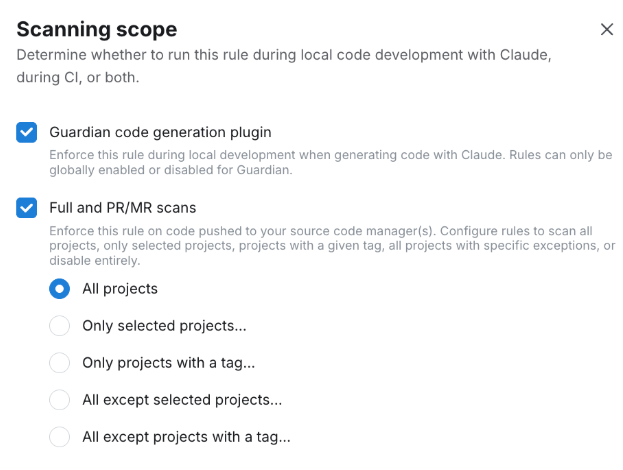
5
Save your changes.
guardian-default ruleset, clear Guardian code generation plugin in that rule’s Scanning scope panel. If the rule isn’t in your Code detection policy, it doesn’t appear on the Policies page, so you might need to add it to the policy before you can open its Scanning scope panel.
Add a rule to Guardian scans from Semgrep Editor
You can also add a single rule to Guardian scans while you view it in Semgrep Editor:1
Sign in to Semgrep AppSec Platform and go to Rules & Policies > Editor.
2
Open the rule that you want Guardian to run.
3
Click Add to detection policy > Enable in Guardian scans.
Add local developer rules
Local developer rules let a developer add their own Semgrep rules without changing the organization’s Policies. Guardian runs them in every scan on that machine or in that repository.Prerequisites
- Guardian is installed. See the Quickstart.
- You have one or more Semgrep rules in YAML files. To write a rule, see Write rules.
Add the rules
To add local developer rules, put your rule files in one of these directories:
For example, this rule file at
.semgrep/guardian-rules/no-eval.yaml flags calls to eval in Python:
Limitations
- Guardian Policies works with the Claude Code and Codex Guardian plugins only. The local Claude Code plugin and other coding agents have no Guardian-specific policy available; they pull all rules enabled on Policies.
- Organization rules support Semgrep Code rules only. You can’t customize which Semgrep Secrets or Semgrep Supply Chain rules Guardian runs.
- Organization rules are available only for organizations that use the current Policies page, and aren’t available for single-tenant deployments.
- Guardian runs up to 1,000 organization rules and up to 50 local developer rules per scan.
Coverage in the guardian-default ruleset
Theguardian-default ruleset is based on p/default. Semgrep includes a rule only when the agent can apply a fix or a sanitizer. Rules that lack a reliable fix can cause the agent to rewrite code incorrectly, so Semgrep omits them.
What Guardian scans for
Guardian scans generated files, so findings can cover:- Code vulnerabilities detected by Semgrep Code
- Vulnerable dependencies detected by Semgrep Supply Chain
- Hardcoded secrets, such as API keys