

INFOYou can also use cross-file (interfile) analysis. For more information, see Perform cross-file analysis. is preferred over join mode where either of the two are feasible. Neither is currently available in Semgrep Community Edition (CE).
Example
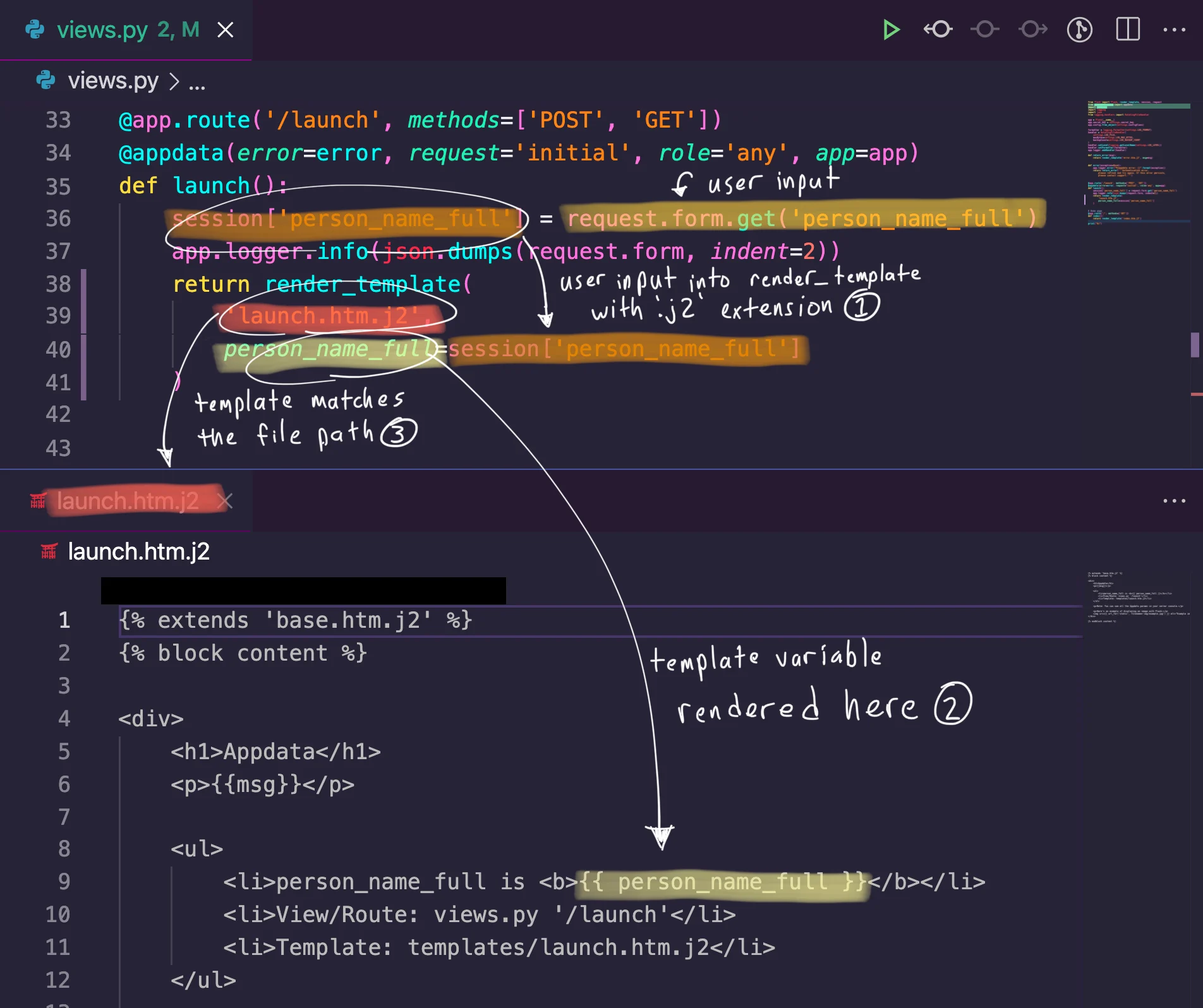
Here’s an example join mode rule that detects a cross-site scripting (XSS) vulnerability with high precision..html extension. Therefore, detecting these two conditions present in a Flask application is a high indicator of
- User input directly enters a template without the
.htmlextension - The user input is directly rendered in the template
- User input
- Templates without the
.htmlextension - Variables rendered in a template
- The variable
$VARfromflask-user-inputhas the same content as the value$VALUEfromunescaped-template-extension - The keyword argument
$VARfromunescaped-template-extensionhas the same content as$...EXPRfromany-template-var - The template file name
$PATHfromunescaped-template-extensionis a substring of the file path of a result fromany-template-var
renames and as keys.
The renames key lets you rename metavariables from one rule to something else in your conditions. This is necessary for named expressions, e.g., $...EXPR.
The as key behaves similarly to AS clauses in SQL. This lets you rename the result set for use in the conditions. If the as key is not specified, the result set uses the rule ID.
Syntax
join
The join key is required when in join mode. This is just a top-level key that groups the join rule parts together.
Inline rule example
The following rule attempts to detect cross-site scripting in a Flask application by checking whether a template variable is rendered unsafely through Python code.rules key are the following:
idlanguages- A set of
patternclauses.
rules key are the following:
messageseverity
NOTERefer to the metavariables captured by the rule in the
on conditions by the rule id. For inline rules, aliases do not work.refs
Short for references, refs is a list of external rules that make up your code patterns. Each entry in refs is an object with the required key rule and optional keys renames and as.
rule
Used with refs, rule points to an external rule location to use in this join rule. Even though Semgrep rule files can typically contain multiple rules under the rules key, join mode only uses the first rule in the provided file.
Anything that works with semgrep --config <here> also works as the value for rule.
renames
An optional key for an object in refs, renames renames the metavariables from the associated rule. The value of renames is a list of objects whose keys are from and to. The from key specifies the metavariable to rename, and the to key specifies the new name of the metavariable.
as
An optional key for an object in refs, as lets you specify an alias for the results collected by this rule for use in the on conditions. Without the as key, the default name for the results collected by this rule is the rule ID of the rule in rule. If you use as, the results can be referenced using the alias specified by as.
on
The on key is required in join mode. This is where the join conditions are listed. The value of on is a list of strings which have the format:
result_set is the name of the result set produced by one of the refs. See the as key for more information.
property is either a metavariable, such as $VAR, or the keyword path, which returns the path of the finding.
operator is one of the following.
Limitations
Join mode is not taint mode! While it can look on the surface like join mode is “connecting” things together, it is actually just creating sets for each Semgrep rule and returning all the results that meet the conditions. This means some false positives will occur if unrelated metavariable contents happen to have the same value. To use join mode withrefs, you must define your individual Semgrep rules in independent locations. This can be anything that works with semgrep --config <here>, such as a file, a URL, or a Semgrep registry pointer like r/java.lang.security.some.rule.id.
Join mode requires login, and does not work in the Semgrep Playground or Semgrep Editor, as it is an experimental feature.
Currently, join mode only reports the code location of the last finding that matches the conditions. Join mode parses the conditions from top-to-bottom, left-to-right. This means that findings from the “bottom-right” condition become the reported code location.
More ideas
Join mode effectively lets you ask questions of entire code bases. Here are some examples of the kinds of questions you can use join mode to answer.- Do any of my dependencies use
dangerouslySetInnerHTML, and do I directly import that dependency? - Does a key in this JSON file have a dangerous value, and do I load this JSON file and use the key in a dangerous function?
- Is an unsafe variable rendered in an HTML template?