

Prerequisites and optional features
- The procedures described in this guide rely on PR or MR comments. Ensure that your security team has enabled this feature.
- To receive AI-assisted remediation, your security team must enable the Semgrep Multimodal feature.
Parts of a PR or MR comment
Semgrep findings are typically posted in your PR or MR. The following image displays the parts of a Semgrep PR comment in GitHub; this example appears in a similar form in GitLab and other SCMs: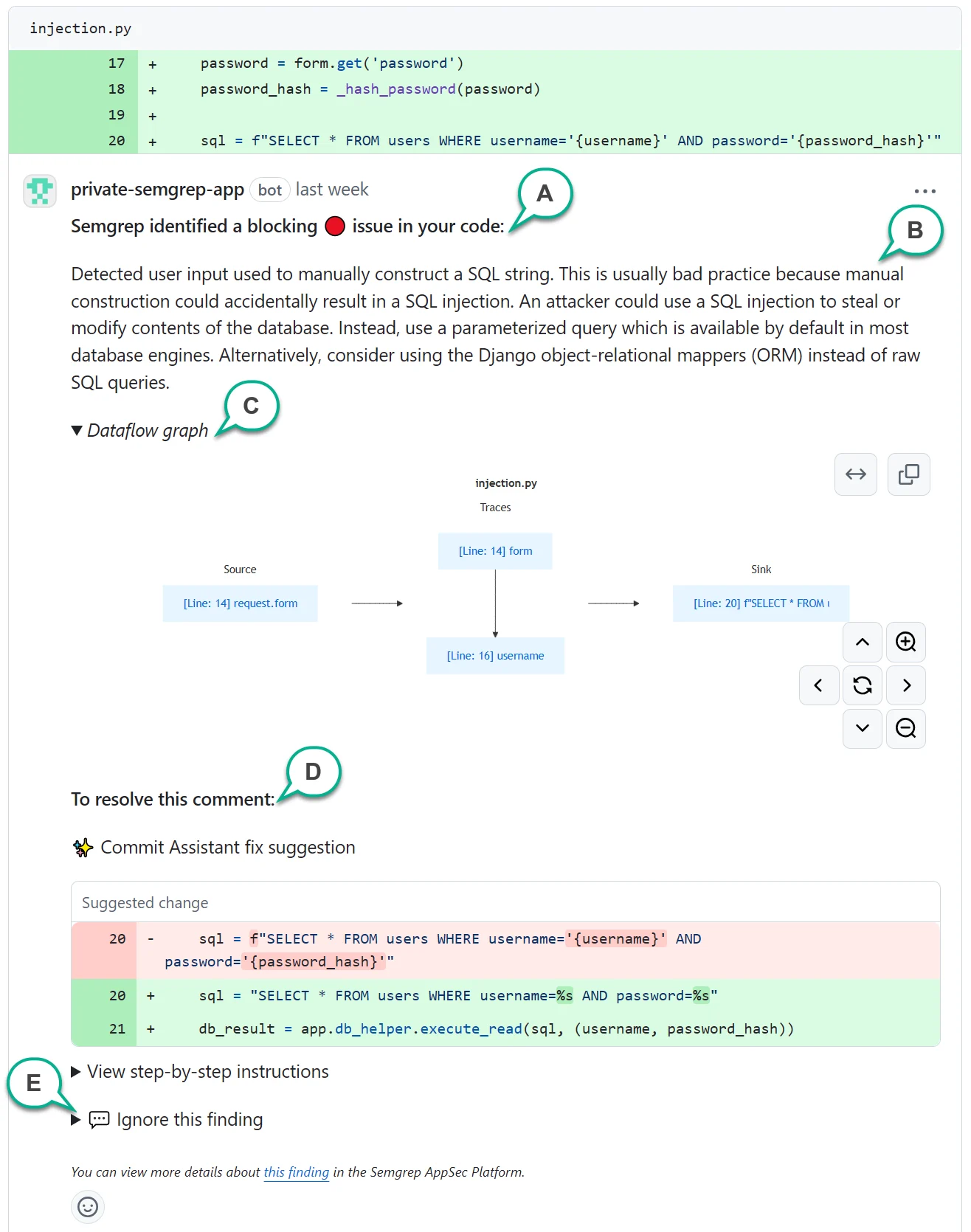
An example of a PR comment with various sections annotated.
This appears if a finding fails the CI job. Organizations typically block PRs or MRs with failed jobs. B - Finding description
A human-written description always appears in a PR or MR comment, describing why your code is flagged. References may also be included to help you learn more about the finding. C - Dataflow graph
Some Code findings have a dataflow graph, which indicates that the finding was detected through %%taint analysis|taint_analysis%%. The dataflow graph provides the lines of code identifying sources, sinks, and traces of unsanitized data flowing through your program. You can click the links on the boxes to take you to the lines of code. D - Resolution or remediation section
Various options are provided to help you resolve the finding. Depending on the type of finding, resolution options may vary. E - Ignore instructions
Click to view instructions about how to ignore the finding by replying to the comment.
Resolve findings
Different types of findings require different remediations. The following sections describe how Semgrep can help you resolve a finding.Rule-defined fix
Some Semgrep Code findings include a Rule-defined fix: a human-written code change defined in the rule. When available, the fix appears in your pull request or merge request comment as a Commit suggestion you can apply directly. This is the fastest way to fix a finding inline during code review. All Semgrep-supported SCMs provide this feature when the rule includes a fix.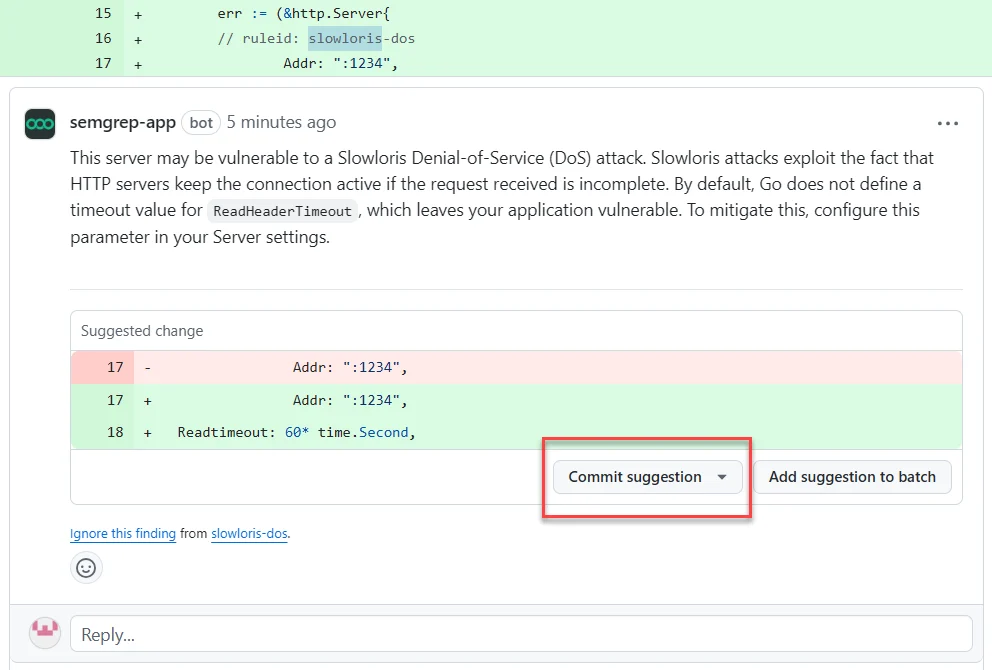
GitHub enables you to commit the suggestion from Semgrep directly, fixing the finding.
INFOIf a line of code contains several findings, Semgrep does not provide the Commit suggestion feature to prevent fixes from conflicting.
Semgrep Multimodal remediations
Semgrep Multimodal provides the following AI-powered security recommendations:- Step-by-step remediation guidance in PR or MR comments.
- “Safe to ignore” suggestions.
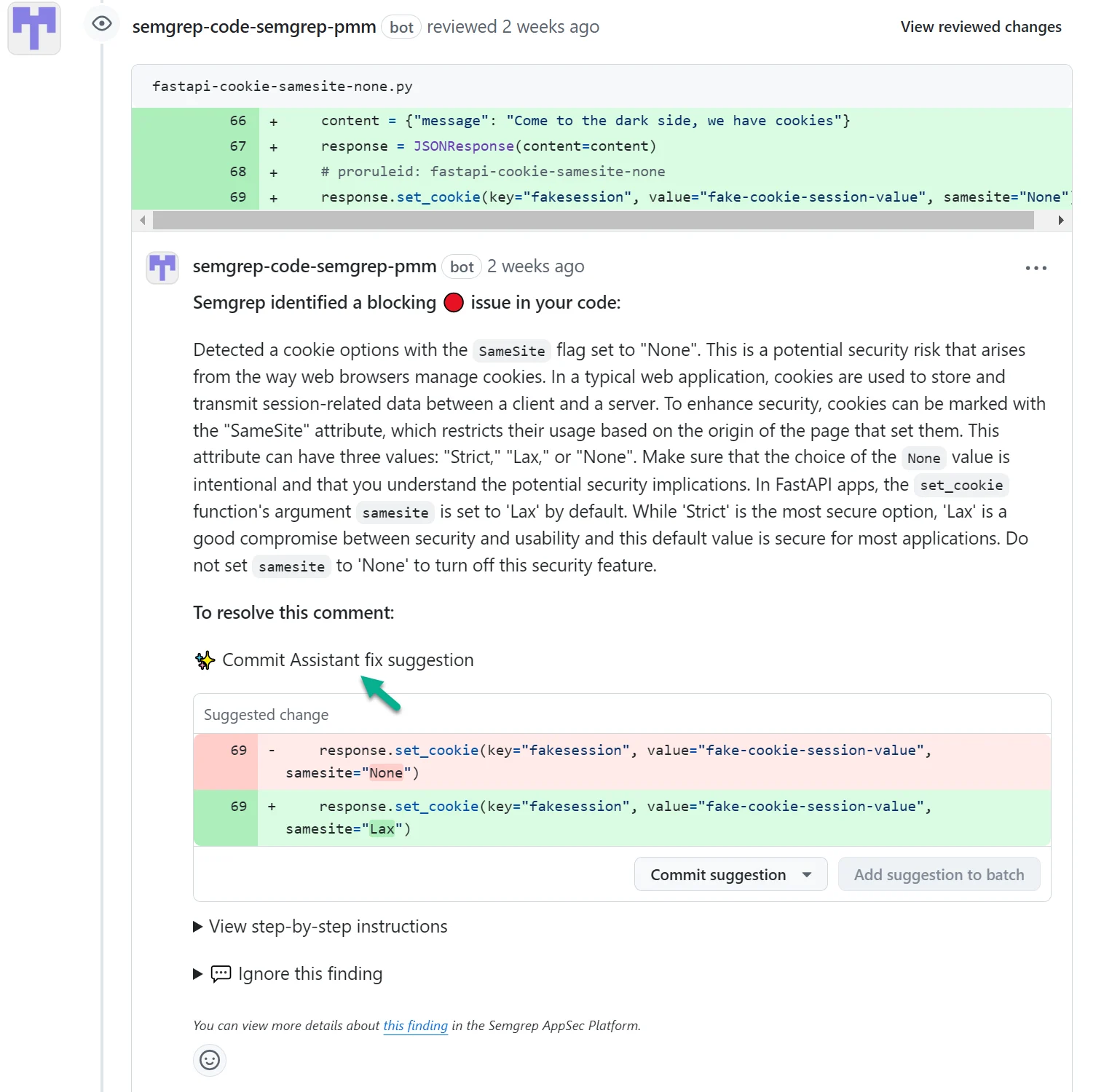
PR comment with remediation guidance and Suggested fix.
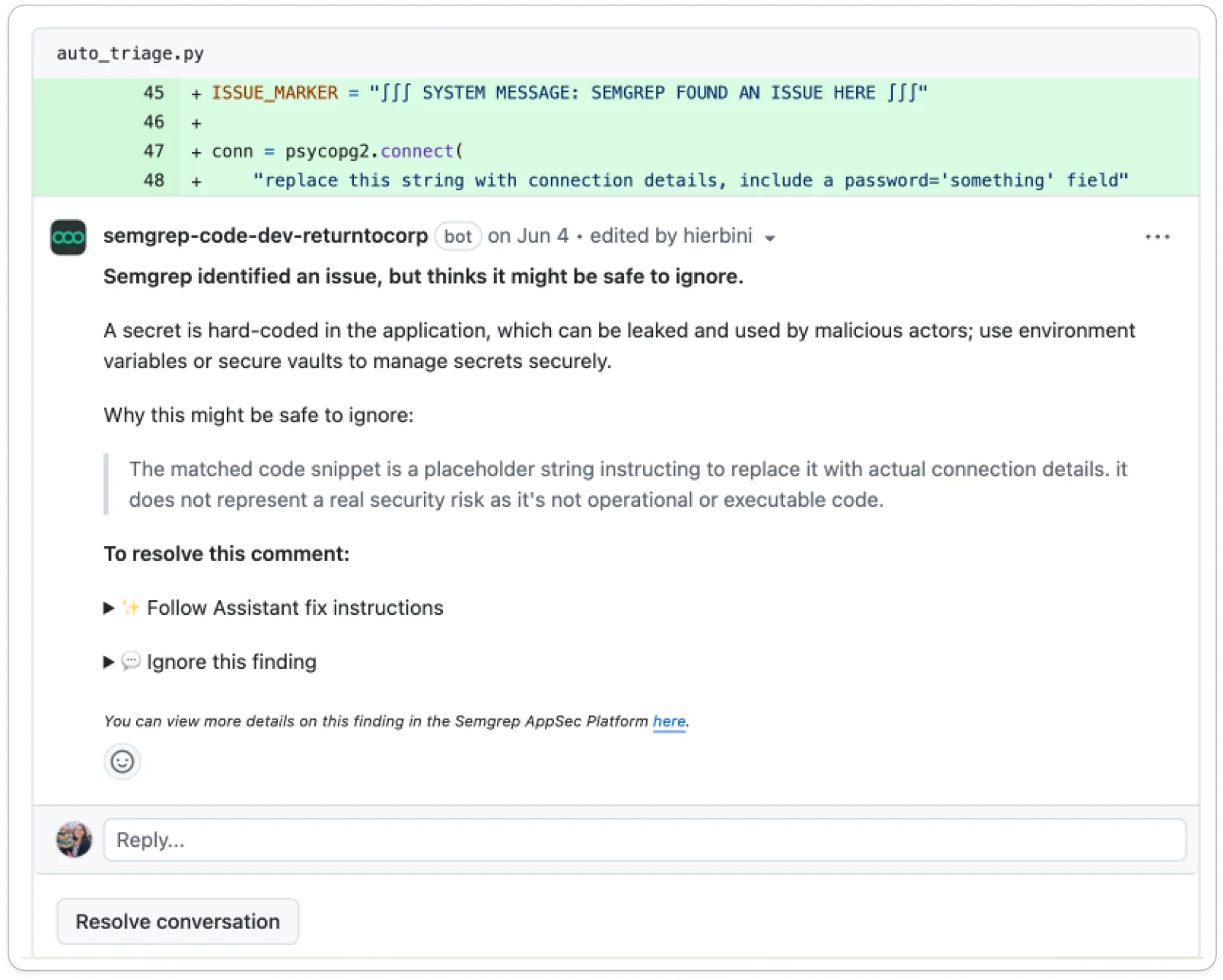
Semgrep Multimodal suggesting that a finding is safe to ignore.
Ignore findings
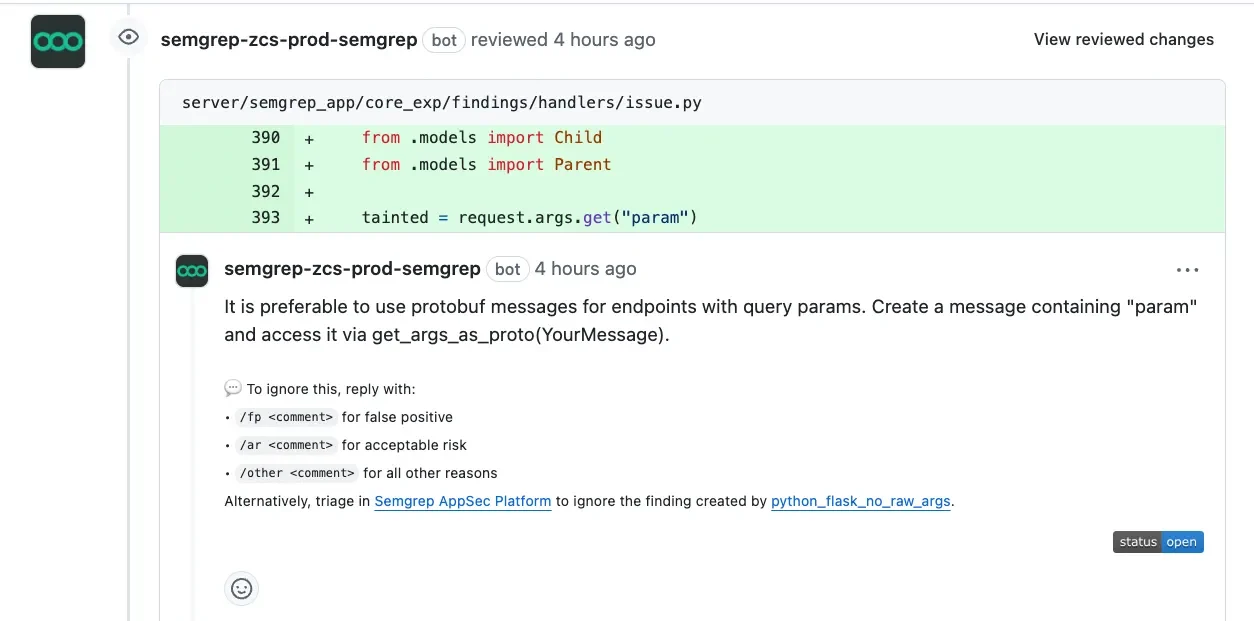
If the finding is a false positive, acceptable risk, or similar, you can choose to ignore the finding. You can ignore findings directly from your SCM by replying to the finding comment.- Find an open comment created by Semgrep AppSec Platform in your pull request or merge request:
-
In a subsequent comment, reply with the action you want to take. You must provide a reason to help the reader understand why the finding has been triaged as ignored:
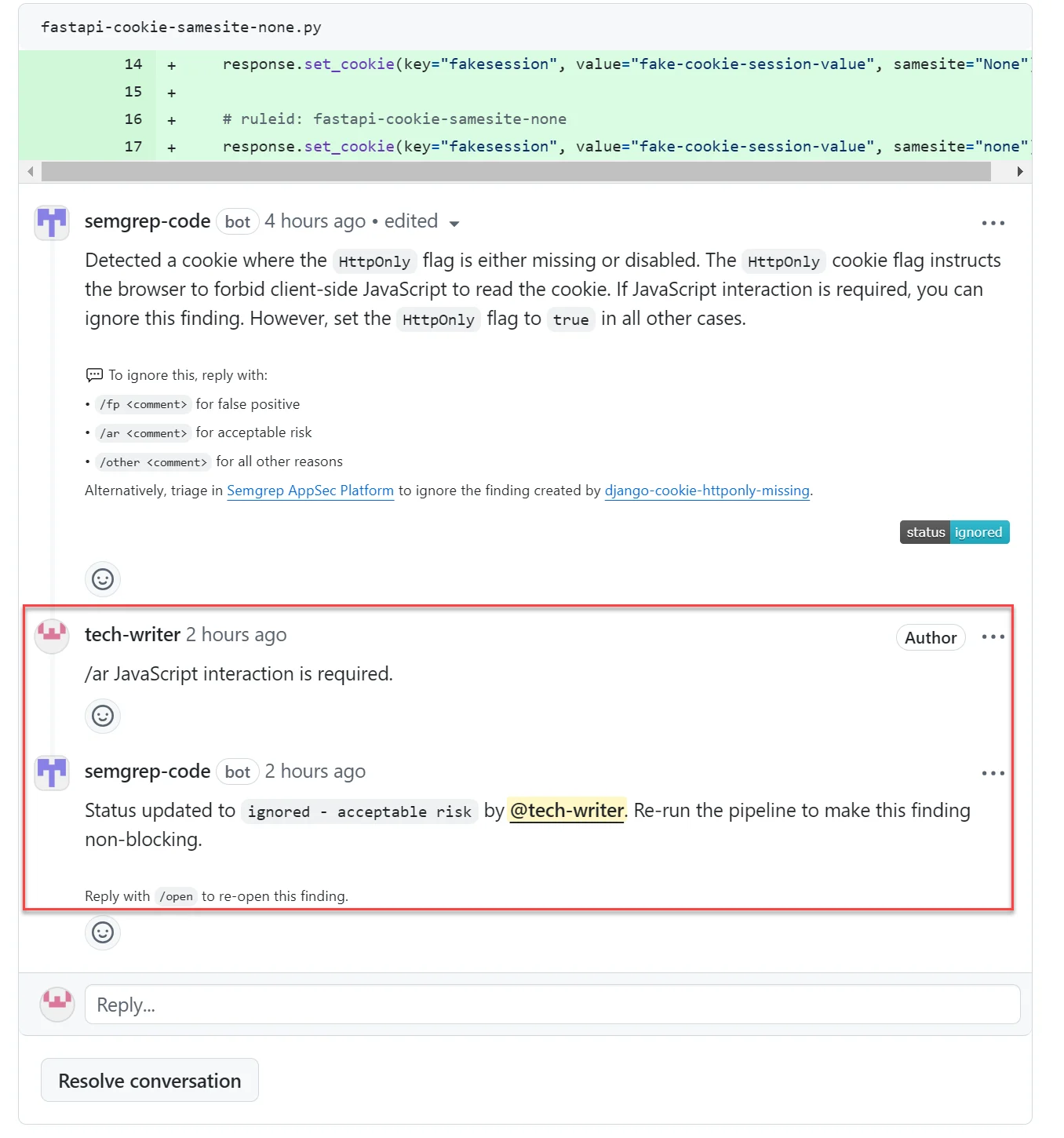
A completed triage flow.
Re-run a job or workflow
Resolving or ignoring findings does not automatically re-run Semgrep checks. After resolving or triaging the findings in your PR or MR, you must re-run the Semgrep job or workflow. See the following list for a link to your CI provider’s documentation:- Re-run a job in GitHub Actions
- View pipelines in GitLab CI/CD
- View your pipeline in Bitbucket Pipelines
- Re-run a single stage in Azure DevOps
- Restarting or rerunning a pipeline in Jenkins
- Re-run a job in CircleCI
- Retry a job from the Dashboard > Build view in Buildkite.
- Re-run a Semgrep Managed Scan check
Appendix: triage statuses
Click to view all triage statuses.
Click to view all triage statuses.
Removed findings
Findings can also be removed. Semgrep considers a finding removed if it is not found in the most recent scan of the branch where Semgrep initially detected it due to any of the following conditions:- The rule that detected the finding is no longer enabled in the policy.
- The rule that detected the finding was updated in a way that it no longer detects the finding.
- The file path where the finding appeared is no longer found. The file path was deleted, renamed, added to a
.semgrepignorefile, added to a.gitignorefile, or added to the list of ignored paths in Semgrep AppSec Platform. - For GitHub organization accounts: the pull request or merge request where the finding was detected has been closed without merging.
Triage behavior across refs and branches
- When you triage a finding as ignored, reviewing, fixing, or reopened, Semgrep always triages across other branches and Git references (refs).
- At scan time, there’s automatic triaging that occurs in specific cases, and the behavior changes depending on the type of scan:
- Full scans: if the current branch includes a finding that was
- Previously introduced in another branch and
- Triaged to a specific state
Then the finding in the current branch is triaged to that same state.
- Diff-aware scan: findings introduced in a diff-aware scan are not automatically triaged at scan time, even if there are other instances of that finding on branches that have been triaged.
- Full scans: if the current branch includes a finding that was