

- Triage security issues
- Follow best practices set by your organization
- Automate code reviews among your peers
- Lint your code
DEVELOPER AND APPSEC ROLESIf you are a developer responsible for your own security program in personal projects, see the Quickstart and Core deployment documentation.
Semgrep AppSec Platform
Semgrep AppSec Platform, or simply Semgrep, is a software suite for implementing and tracking security programs. AppSec engineers use Semgrep to detect, triage, and remediate findings across an entire organization’s codebases. Developers primarily interact with Semgrep when Semgrep scans a project, then notifies users of issues in their code. Issues detected by Semgrep are called findings. The pattern-matching logic by which Semgrep detects a finding is encapsulated in a rule. Semgrep performs various static analyses to detect bugs, vulnerabilities in dependencies, and leaked secrets.How developers use Semgrep
Your interactions with Semgrep vary depending on your organization’s deployment of it. Semgrep is almost always integrated into your CI and source code manager (SCM) and automatically runs on every pull request or merge request you open. These scans are diff-aware and only affect the scope of your PR, which keeps the scan speed fast. Your security engineer may configure Semgrep to display PR or MR comments about certain blocking or non-blocking findings to you, which you can resolve or ignore from within your SCM. It is less frequent, but still common, for developers to run Semgrep as part of their day-to-day coding workflow in the following environments:- IDEs (VS Code and IntelliJ)
- CLI, including
pre-commit
Semgrep findings in your PR or MR
Semgrep findings are typically posted in your PR or MR. The following image displays the parts of a Semgrep PR comment in GitHub; this example appears in a similar form in GitLab and other SCMs: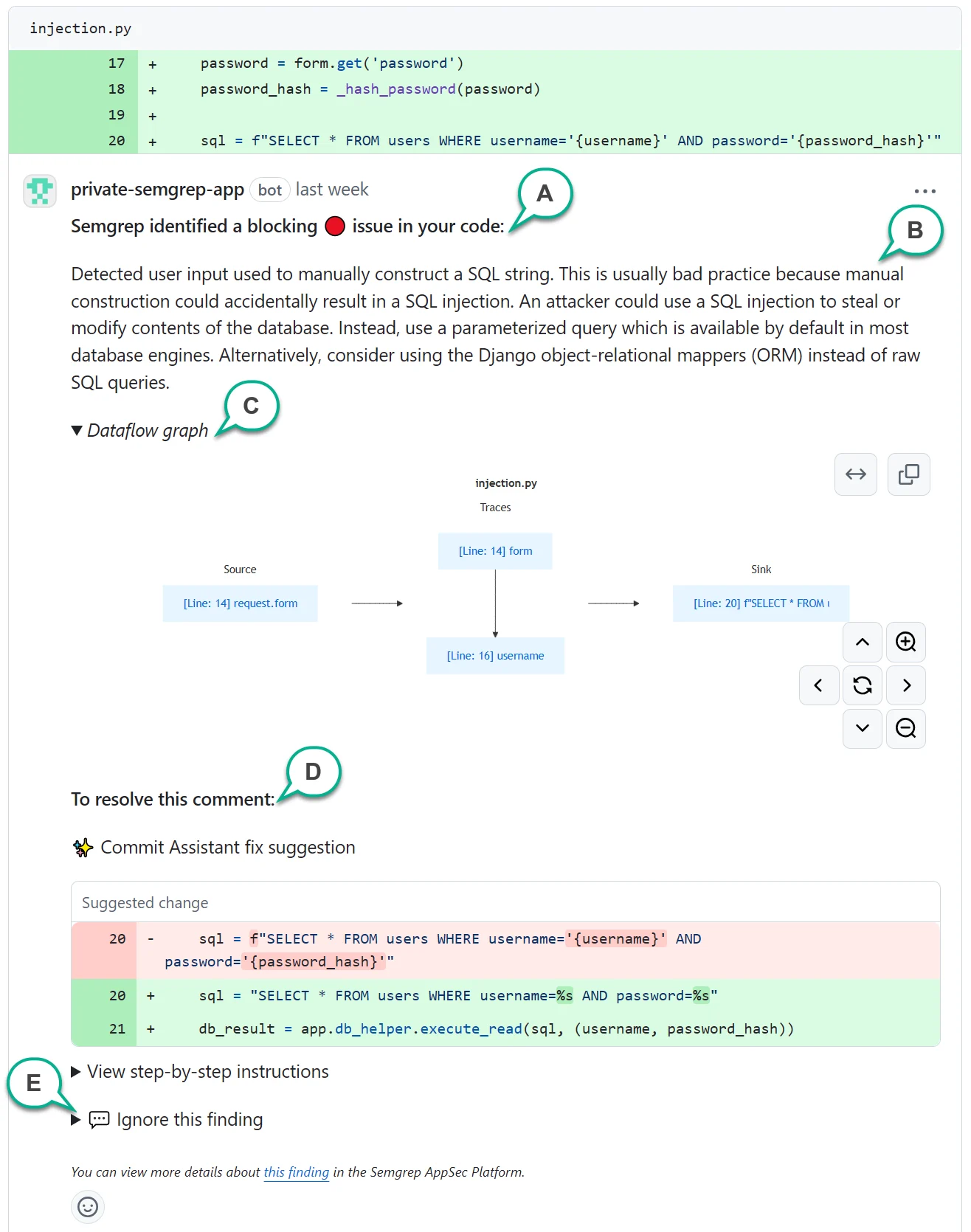
An example of a PR comment with various sections annotated.
This appears if a finding fails the CI job. Organizations typically block PRs or MRs with failed jobs. B - Finding description
A human-written description always appears in a PR or MR comment, describing why your code is flagged. References may also be included to help you learn more about the finding. C - Dataflow graph
Some Code findings have a dataflow graph, which indicates that the finding was detected through %%taint analysis|taint_analysis%%. The dataflow graph provides the lines of code identifying sources, sinks, and traces of unsanitized data flowing through your program. You can click the links on the boxes to take you to the lines of code. D - Resolution or remediation section
Various options are provided to help you resolve the finding. Depending on the type of finding, resolution options may vary. E - Ignore instructions
Click to view instructions about how to ignore the finding by replying to the comment.
Type of findings by resolution
Code findingThis type of finding is typically resolved by refactoring your code. This finding typically catches bugs, security issues, or violations of best practices. Dependency finding
Semgrep found that you’re using a vulnerable version of a dependency. It can also detect if you’re using the vulnerable function or code of the dependency. License finding
Semgrep has found that you’re using a dependency with a license that may violate the guidelines set by your organization. Secrets finding
Semgrep has detected a leaked secret. Rotate the secret to resolve this finding.
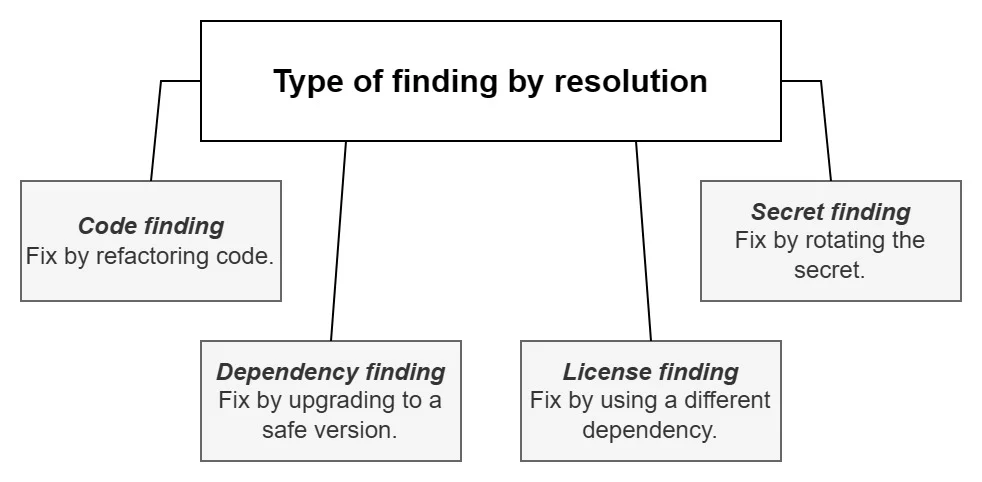
Summary of findings by resolution, assuming that the finding is a true positive.