Once added to Semgrep, a codebase, repository, or subfolder within a monorepo is referred to as a project. Deployment refers to the process of integrating Semgrep into your developer and infrastructure workflows. Completing the deployment process provides you with the Semgrep features that meet your security program’s needs. Deployment includes:Documentation Index
Fetch the complete documentation index at: https://docs.semgrep.dev/llms.txt
Use this file to discover all available pages before exploring further.
- Running Semgrep scanners as part of your CI. These scans can be any combination of SAST (Static Application Security Testing), SCA (Software Composition Analysis), or Secrets, depending on your plan.
- Managing team members’ access and authentication.
- Ensuring that Semgrep has sufficient access to your self-hosted source code manager (SCM), such as GitLab Self-Managed.
- Customizing your SAST, SCA, or secrets scans
- Custom rule writing
- Triage
All Semgrep deployment features
Semgrep supports many different technology stacks. Refer to the following table to evaluate which deployment features of Semgrep you can use based on your technologies.Core deployment
These are the absolute minimum Semgrep features for any deployment.| Deployment feature | Notes |
|---|---|
| SAST scanning | Check that Semgrep:
|
| SCA scanning | Check that Semgrep either supports your manifest file or lockfile and package manager. |
| Secrets scanning | Check that your services, such as Slack or Twilio, can be validated by Semgrep. Semgrep Secrets is available through Semgrep Sales, so you must Book a demo. |
| SSO | Semgrep supports:
|
| Organizations | Semgrep can connect to orgs from GitHub and GitLab. Connecting an org enables Semgrep AppSec Platform to authenticate new users from the same org easily. If you use Bitbucket or Azure Repos, you can use SSO to manage the authentication of your users, then add repositories for scanning through your CI provider. |
| Scanning remote repositories through CI | Semgrep fully supports many popular CI providers. See Add Semgrep to CI. |
| Managed Scans: scanning remote repositories in bulk without CI changes | An alternative method of scanning many repositories with Semgrep that doesn’t require integration with your CI. Requires read access to user-selected repositories. See Add repositories to Semgrep in bulk. |
| PR or MR comments | Semgrep can post PR or MR comments in the following SCMs:
|
Additional deployment features
Useful features that you can add based on your tech stack. You can integrate these features further into your security workflows after some initial testing of your core deployment.| Deployment feature | Notes |
|---|---|
| Notifications | Semgrep can send notifications through the following channels:
|
| AI-assisted triage and remediation | Semgrep can give AI-assisted recommendations on whether a finding is a true or false positive as well as suggest code fixes for true positive findings. |
| IDE integration | Encourage developers to run Semgrep in their IDE. Officially supported extensions include:
|
| API | Check that Semgrep’s API meets your needs. See API docs. |
Core deployment process
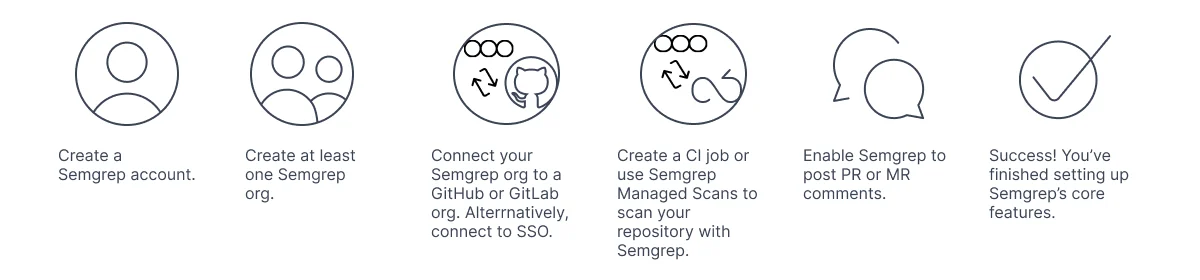
At the minimum, your deployment of Semgrep consists of the following steps:Setting up organizations (orgs).
Each Semgrep account can have many orgs. Orgs are logical groupings of related projects and users.
Setting up membership:
- For GitHub or GitLab users, you can connect your Semgrep org to the orgs in your source code manager (SCM). This means that any member of an org in your SCM can sign in to your Semgrep deployment.
- You can also use SSO to manage user authentication.
Adding Semgrep into your CI workflows.
This step ensures that your Semgrep deployment is up and running and that you receive findings of security issues in Semgrep AppSec Platform.
- Role management
- Tagging projects