
Documentation Index

Fetch the complete documentation index at: https://docs.semgrep.dev/llms.txt

Use this file to discover all available pages before exploring further.

If you run the alternate job and it fails with a “resource not accessible by integration” error, there are two possible causes.

Your repository’s workflow permissions are set to read-only

Repository-level workflow permissions are set to read-only (default) unless they’ve previously been changed. Use of the permissions key within the workflow file does not override this setting. To update this setting:
1
Navigate to your organization or repository in GitHub.
2
Click Settings > Actions > General > Workflow permissions.
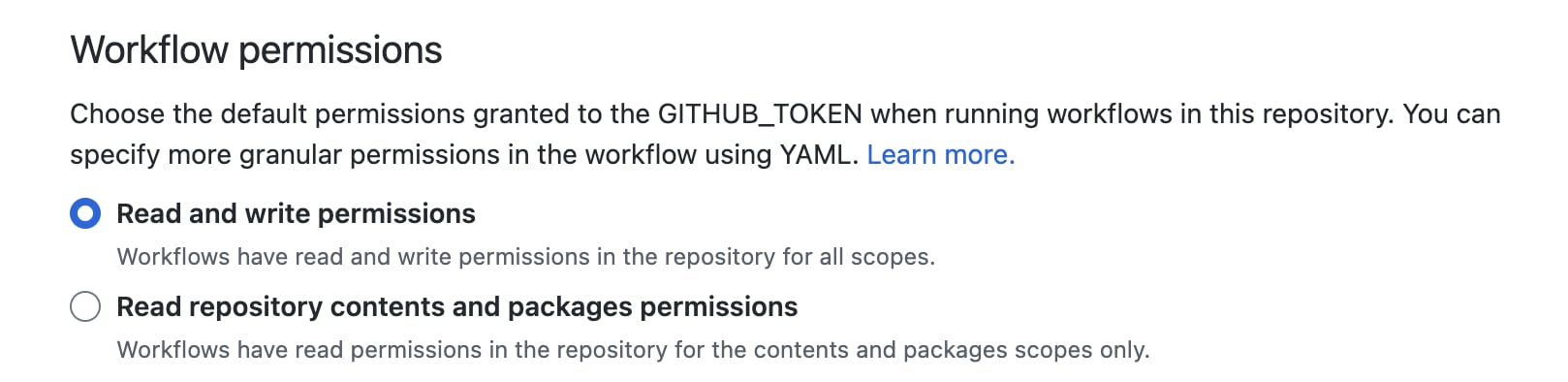
image info
Target permissions
INFOChanging the repository’s default workflow permissions changes the permissions for all workflows in that repository. Use of the permissions key will not override this setting, so updating it is a required step. Learn more about the permissions key at Assigning permissions to jobs, or review the example workflow-level permissions below.

The workflow or job does not have the correct permissions in a private repository

In order for Semgrep findings in a private repository to appear on the GitHub Advanced Security Dashboard, you must ensure that the appropriate permissions are configured at the workflow level using the permissions key. See the following example.

Example job configuration with permissions key

This job only requires write permissions for security-events.
# Name of this GitHub Actions workflow.
name: Semgrep

on:
  pull_request: {}
  workflow_dispatch: {}
  push:
    branches: ["master", "main"]
  schedule:
    - cron: '20 17 * * *' # Sets Semgrep to scan every day at 17:20 UTC.

jobs:
  semgrep:
    name: semgrep/ci 
    runs-on: ubuntu-latest

    container:
      # A Docker image with Semgrep installed. Do not change this.
      image: semgrep/semgrep

    if: (github.actor != 'dependabot[bot]')
    permissions:
      # required for all workflows
      security-events: write
      # for workflows in private repos
      actions: read
      contents: read
    steps:
      - uses: actions/checkout@v6
      - run: semgrep ci --sarif > semgrep.sarif
        env:
          SEMGREP_APP_TOKEN: ${{ secrets.SEMGREP_APP_TOKEN }}
      - name: Upload SARIF file for GitHub Advanced Security Dashboard
        uses: github/codeql-action/upload-sarif@v2
        with:
          sarif_file: semgrep.sarif
        if: always()