

Product terms
The offerings in this document are defined as follows: Semgrep Community Edition (Semgrep CE)Includes an open source, lightweight SAST scanner and rules in the Semgrep Registry with open source licenses. You can also write your own custom rules. Semgrep CE also includes the Visual Studio Code (VS Code) and IntelliJ extensions. The Community Edition is best for small teams or personal projects. Semgrep AppSec Platform (Semgrep)
Refers to a proprietary software suite tailored to support AppSec engineers through the entire software development life cycle (SDLC). Best for deploying security programs throughout their organization. Many of Semgrep’s features support the deployment of secure guardrails. Semgrep includes the following products: Semgrep Code
A SAST scanner that uses cross-file (interfile) and cross-function (intrafile) analysis for improved results over Semgrep Community Edition. Semgrep Code includes rules written by Semgrep’s Security Research team, called Pro Rules. These rules use cross-file analysis to reduce false positives. Semgrep Supply Chain
A high-signal dependency scanner that detects reachable vulnerabilities in open source third-party libraries and functions across the software development life cycle (SDLC). Semgrep Secrets
A secrets scanner that, in addition to detecting secrets, validates these leaked secrets on a variety of services to help you prioritize active secrets.
NOTESemgrep Code and Semgrep Supply Chain are free for up to 10 contributors.
Comparison by core workflows

A typical AppSec security program's core workflows and the scope of out-of-the-box Semgrep CE and Semgrep AppSec Platform features.
Deployment
The process of integrating Semgrep into your developer and infrastructure workflows.Semgrep Community Edition
Semgrep CE runs in your local machine’s CLI through thesemgrep scan command.Deploying in bulk or at scale is a manual task. Semgrep CE can scan a remote repository by running as part of a CI job but you must write and configure the CI job for each repository.Semgrep AppSec Platform
Semgrep can scan in the following environments:- CI
- Web app (for Managed Scans)
- CLI
- IDE
pre-commit
Scanning and analyses
The process of analyzing source code for findings. This section explains the analyses available to both product offerings.Semgrep Community Edition
Semgrep CE provides the following SAST analyses:- Single file, cross function constant propagation
- Single function taint analysis
- Semantic analysis
Semgrep AppSec Platform
Semgrep supports SAST, SCA, and secret scans as listed in Product terms. You can run these scan types across all of your environments, preserving any configuration you have made.Click to view Semgrep Code analyses (SAST)
Click to view Semgrep Code analyses (SAST)
- Cross file, cross function constant propagation
- Cross file, cross function taint analysis
- Framework and language-specific semantic analysis
- Semgrep Multimodal (AI-assisted) post-processing analysis:
- Reduces noise by 20%
- Adds contextual remediation guidance
Click to view Semgrep Supply Chain analyses and functions (SCA)
Click to view Semgrep Supply Chain analyses and functions (SCA)
- Reachability analysis
- Open source license enforcement
- Dependency search
Click to view Semgrep Secrets analyses and functions
Click to view Semgrep Secrets analyses and functions
- Validation of active, leaked secrets
- Entropy
- Historical scanning
The following diagrams summarize the differences between the two:

Semgrep CE scan process.

Semgrep AppSec Platform scan process.
Triage and remediation
Triage is the process of reviewing findings and determining if a finding is a true or false positive, and whether to fix the finding or not. Remediation refers to the steps taken to resolve the finding. Ticketing and notification integrations are included in this workflow to inform developers of fixes and remediation guidance they may need to take to close the finding.Semgrep Community Edition
Triage
There are no out-of-the-box features in Semgrep CE for triaging findings.However, you can output findings to JSON and SARIF then send those findings to an AppSec Posture Management (ASPM) software such as DefectDojo.Semgrep AppSec Platform
Triage
Semgrep tracks a single finding throughout its lifetime from its initial creation, when its status is Open, to various triage states such as Ignored, or Reviewing.Developers and AppSec engineers are able to provide reasons for a finding’s status, such as Acceptable risk or False positive for Ignored findings.Semgrep provides AI-assisted triage through Semgrep Multimodal, which can analyze all your findings to suggest which findings it thinks are false positives.Click to view Semgrep Multimodal analyses and functions
Click to view Semgrep Multimodal analyses and functions
- Step-by-step remediation
- Can be viewed by developers and AppSec engineers in their preferred environment
- Ability to learn your preferred libraries and functions through Memories
Tuning and prevention
Tuning refers to the improvement of Semgrep’s engine, rules, and policies to improve such metrics as the true positive rate, net new findings, and findings fixed before they enter production. Tuning assists in the prevention of vulnerabilities from entering production.Semgrep Community Edition
Tuning is not supported in Semgrep CE, but you can customize the rules you run on your scans.Semgrep CE does not provide any metrics that may inform you of potential performance improvements you can make.Semgrep AppSec Platform
The Policies feature manages rules, helps block PRs or MRs from entering production, and configures which findings are presented to developers.You can test a rule’s performance by first monitoring its performance (and showing it only in AppSec environments), then changing its mode to leave comments or help block a PR or MR from merging.You can also write custom rules and share these rules with the rest of your organization.Reporting
Track the success of your security program and trends over time by generating reports.Semgrep Community Edition
Semgrep CE does not include any reporting features.Semgrep AppSec Platform
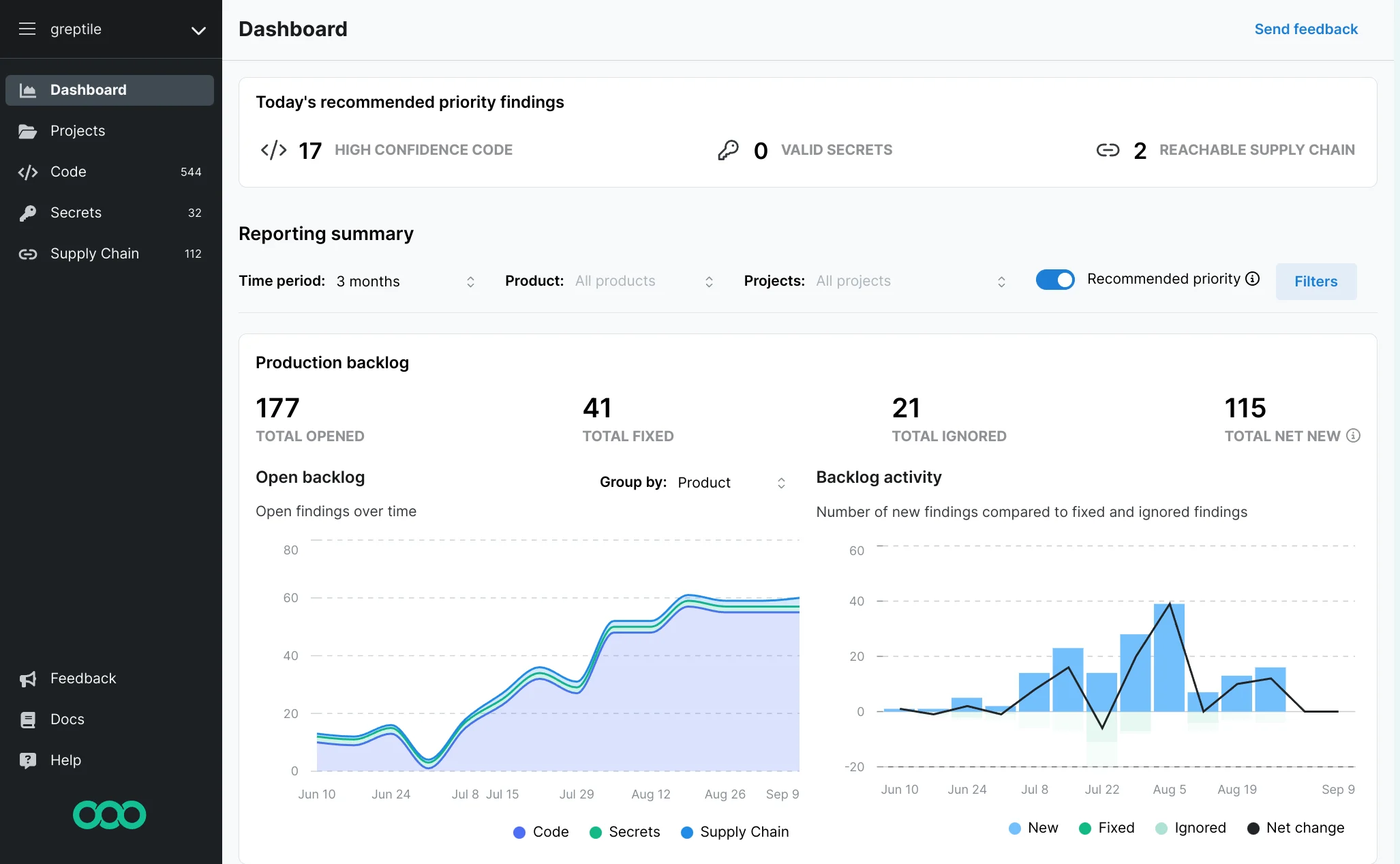
Semgrep’s dashboard provides filters to create multiple views over different periods of time.It is optimized to show progress towards the adoption of a secure guardrails approach to AppSec through the following key metrics:- Findings shown to developers
- Findings fixed before backlog (before entering production)
- Most findings by project
Appendix
This section provides a comprehensive comparison of each offering’s features.Deployment
Semgrep Community Edition
Semgrep AppSec Platform
- Local scans
- Automated set up with various CI providers through the web app
- Manual configuration options for other providers
- IDE plugins with persistent settings across your organization
pre-commitwith persistent settings across your organization- Connects to GitHub, GitLab, Bitbucket, and Azure DevOps repositories
- Secure access between your private network and Semgrep through the Network Broker
- Single tenancy
- Managed scans
- SSO and managed authentication through GitHub or GitLab
- Project management, such as tagging, setting of a primary branch, and so on; a project can either be a repository or a folder within a monorepo
- Team management
Scanning and analyses
Semgrep Community Edition
Semgrep CE provides cross function constant propagation and single function taint analysis.Semgrep Community Edition (SAST)
Semgrep AppSec Platform
All Semgrep products make use of cross file, cross function taint analysis and more.Semgrep Code (SAST)
- 35+ supported languages
- Pro (professionally written and maintained) and Community rules
- Framework-specific and language-specific analysis—see Java examples and Python frameworks coverage
- Code search
Semgrep Supply Chain (SCA)
- 10+ supported languages
- Manifest files, lockfiles, and reachability analysis
- 100% of High and Critical CVEs covered for supported languages since May 2022
Semgrep Secrets
- Entropy, semantic analysis, and validation ensure that detected keys are actually active and leaked
- 630+ credentials or keys detected by Semgrep Secrets
- Historical scans
Triage and remediation
Semgrep Community Edition
- You must manually set up Semgrep CE to send findings to an ASPM.
Semgrep AppSec Platform
- Semgrep tracks triage states and enables triage from findings in any supported environment (CLI, CI, IDE, your PR or MR). See Code > Findings for more information.
- Filtering by severity, confidence, and many other attributes assist in managing volume.
- AI-assisted triage and remediation
- AI-assisted component tagging
- AI-assisted Memories, which enable you to tell the AI organization specific libraries to suggest when guiding developers
- PR comments or MR comments can be sent to developers in their native environment (GitHub, GitLab, Azure DevOps, Bitbucket) and developers can triage in their native development through triage commands
- Slack, email, and webhook notification channels
- Creation of Jira tickets and customizable mapping of attributes
Tuning and prevention
Semgrep Community Edition
Minimal customization options to tune your scans:- Customize SAST scans through the rules you run in the CLI
- Write custom SAST rules
Semgrep AppSec Platform
- Customize scans through rule selection in policies
- Write, save, manage, and fork custom SAST and Secrets detection rules in the Editor
- Store rules in Semgrep AppSec Platform and deploy to your organization
- Policy-based workflows: Semgrep can perform workflow actions such as failing a CI job or leaving a PR comment based on user-defined policies for all scans
Reporting
Semgrep Community Edition
- You must manually set up Semgrep CE to send findings to an ASPM.